
Voicemail Script Generator: What to Say When You Leave One
Choose why you are calling, add your name and number, and get a clear message to read out.
Free · runs in your browser · nothing is uploaded
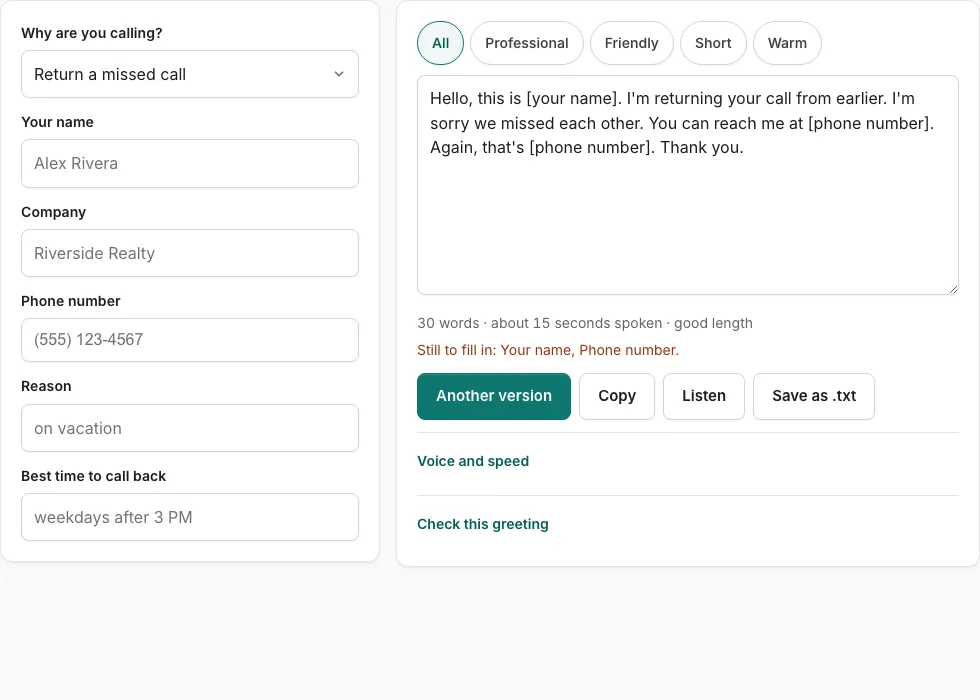
How to use the Voicemail Script Generator
- Choose the reason for your call from the ten options, such as return a missed call, sales follow-up, or invoice reminder.
- Pick one of the scripts for that reason. Each reason has several scripts, so pick the one closest to what you need to say.
- Fill in your name, company, phone number, reason, time, topic and date. Empty fields show a placeholder, so you can see what is still missing. Check that the number in the script is correct before you copy it.
- Check the length estimate after each change you make. A spoken message should usually fit in 20 to 30 seconds.
- Click Listen to hear how the script sounds when read aloud.
- Click Copy to paste the message into your phone notes or an email, or click Save as .txt to keep a file.
Sales scripts use a Persuasive tone, so check that tone matches how you want to sound before you use one. At least four of the seven sales scripts include an easy opt-out line, and none uses false urgency. Invoice reminders are polite and factual, and doctor’s-office scripts leave out health details.
Why does the phone number appear twice?
Every script includes the phone number early and again at the end, so the person you are calling can hear it clearly even if the first mention is missed.
How do I leave a good voicemail message?
Say your name and the reason for your call in the first few seconds. Give your phone number early in the message and again at the end, so the listener does not need to replay it to find it. Keep the whole message short, usually 20 to 30 seconds, and close with one clear next step.
- State who you are and why you called.
- Say your phone number early, then repeat it at the end. Every script in the tool does this.
- Name one specific reason to call back. For a sales call, this should be one clear benefit worth the prospect’s time.
- For sales calls, include an easy opt-out line and avoid false urgency.
- For a doctor’s office, leave out health details and ask for a call back about the matter.
- Check the length with Listen, then use Copy or Save as .txt.
Which fields does the tool use?
The fields are your name, company, phone number, reason, time, topic and date. Empty fields show as placeholders, so check for them before you copy the text. Leave a field empty if it does not apply. Your phone number appears at least twice in every script, early and at the end.
Which tone should I use?
The Persuasive tone appears on sales scripts. Invoice reminders are polite and factual. At least four of the seven sales scripts include an easy opt-out line, and none uses false urgency. Doctor’s-office scripts leave out health details.
How long should a voicemail be?
A spoken voicemail should usually be 20 to 30 seconds long. A sales voicemail should stay under 30 seconds. The length estimate in the tool shows you how long your filled-in script will take to say. If it runs long, cut the background and keep the reason and the phone number. Listen plays the message aloud so you can hear the timing before you copy it.
| Message type | Target length |
|---|---|
| Spoken voicemail, any reason | 20 to 30 seconds |
| Sales voicemail | Under 30 seconds |
Frequently asked questions
What do you say when you leave a voicemail?
Start with your name and the reason for your call, then say your phone number. The scripts in the tool also repeat the number near the end, so the listener has it twice.
How do I write a voicemail script for call back?
Choose the return a missed call reason, then fill in your name, phone number, and the time or date of the missed call. Copy the script once it reads the way you want.
What is a good voicemail message script?
Pick the script that matches your reason for calling from the 70 options in the ten categories. Fill in your details so the message is ready to leave without writing it from scratch.
How do I write a voicemail script for work?
Pick a work reason such as confirm or change an appointment, job application follow-up, or thank you after a meeting. Enter your company name in the company field so the person knows who is calling.
What should you say in a sales voicemail?
Say who you are and your company, explain why you are reaching this particular prospect, and give one benefit that is worth a call back. The sales scripts use a Persuasive tone, include an easy opt-out line, and avoid false urgency.
How do I personalize my voicemail?
Fill in your name, company, phone number, reason, time, topic and date. Any field you leave empty shows a placeholder, so you can see what still needs your details before you copy the message.
Related tools
- Voicemail Message Examples: Use it for 70 message examples to personalise.
- Voicemail Greeting Generator: Use it for greeting scripts for 17 situations.
- How to Record a Voicemail Greeting Online: Use it for record and download a phone-ready WAV.
- Voicemail Greeting Script Builder: Use it for build a script block by block.
- Voicemail Greeting Text to Speech: Use it for listen with your device’s voices.
- Voicemail Greeting WAV Converter: Use it for convert audio to a phone-system WAV.
- Voicemail Tools: Use it to browse message scripts, read-aloud, recorder, converter.