
Voicemail Message Examples
Browse examples for each reason for calling. Add your name and number once and every message updates.
Free · runs in your browser · nothing is uploaded
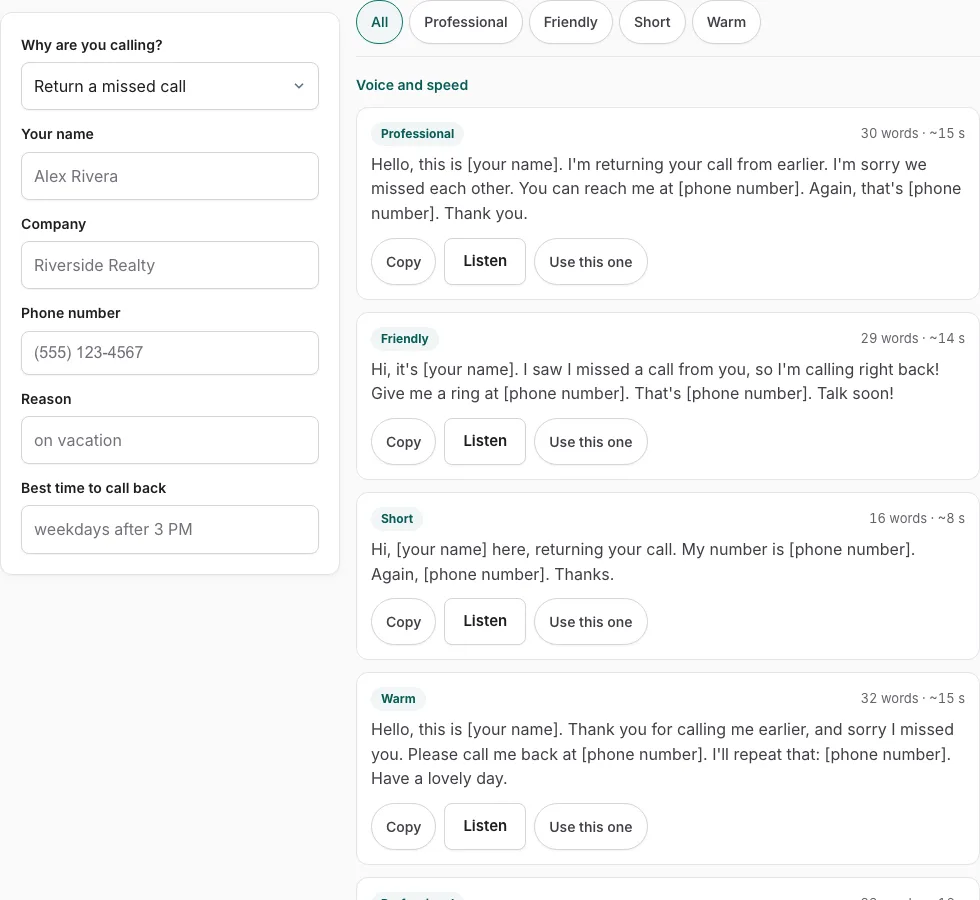
How to use the voicemail message examples tool
- Open the menu and choose the reason for your call. The list shows every message for that reason.
- Fill in the fields on the left. Every card updates with the details you enter.
- Press a tone button to filter the cards by tone, or leave them all showing.
- Check the tone, word count and estimated seconds on each card to find a length that suits your call.
- Press Listen to hear the message read through before you use it.
- Press Copy to take the text, or Use this one to pick the message you want.
What each control does
| Control | What it does |
|---|---|
| Menu | Lists the messages for the reason you chose |
| Fields on the left | Personalise every card as you type |
| Tone buttons | Filter the cards by tone |
| Listen | Reads the message aloud |
| Copy | Takes the text |
| Use this one | Picks the message you want to use |
Switch reasons to see different wording, since the ten reasons together hold 70 messages. Each message is personalised live, so the text you copy already includes the details you typed into the fields.
Can I use these as my own greeting?
No. These are messages you leave for someone else, not greetings for your own mailbox. Each card shows the tone, so pick one that fits the call.
What does a good voicemail message sound like?
A good voicemail message is short, clear and easy to act on. It states who is calling, why, and how the person can reach you, and it stops before the listener loses the thread. Most people hear a voicemail once, often in a hurry, so the wording needs to be plain enough to follow on a single listen.
Tone matters too. A message to a colleague can be brief and informal, while a message to a customer or a new contact usually needs a more polite opening and a clear next step. Length matters as well. Each card shows its estimated seconds, and a shorter message is easier to follow. Press Listen before you leave the message, because hearing the words aloud shows whether they sound natural.
How do you find the right message on this page?
Choose a reason from the menu. The page then lists every message for that reason, and there are 70 across ten reasons. Tone buttons filter the list to the style you want. Each card shows its tone, word count and estimated seconds, with three actions: Copy, Listen and ‘Use this one’. The fields on the left personalise every card before you copy it.
Note that these are messages you leave for someone else, not greetings for your own mailbox.
What should you say when you leave a voicemail?
Say who you are, what you need, and when or how the person can reach you. Those three points cover what most listeners need to act on the message, and they keep it focused.
- State your name and, if it helps the listener, your company or department.
- Give the reason for your call in one sentence.
- Say when you can be reached, or when the listener can expect to hear back from you.
- Say your phone number slowly, then repeat it at the end.
Check the seconds before you choose, so the message stays short enough to follow on one listen.
Frequently asked questions
Voicemail message examples for work
Work messages follow the same structure as other messages: your name, your company or team, the reason for the call, and a clear next step. Choose a work reason from the menu, then pick a tone that suits your role. Fill in the fields on the left so each card carries your own details.
Voicemail message sample personal
For a personal call, choose the reason that fits the situation and use the tone buttons to filter the cards. Pick the wording that sounds most natural to you. Check the estimated seconds so the message stays short and easy to follow.
Voicemail message examples out of the office
This tool gives messages you leave on someone else’s voicemail, so it does not provide an out-of-office greeting for your own mailbox. If you want to tell callers that you are away, use the wording on Voicemail Greeting Examples instead.
How do I personalize my voicemail?
Fill in the fields on the left, and every card updates to use those details. Copy the card you want, and the personalised text is ready to use without rewriting each line. To change the greeting on your own mailbox, see the greeting pages listed below.
How often should voicemail greetings be updated?
Update your greeting whenever your availability changes, such as during holidays, vacations or when your working hours change. There is no fixed schedule, so the rule is to change it as soon as your situation does. Callers then hear accurate information.
What are some good voicemail greetings?
A greeting on your own mailbox is a different job from the messages on this page. For sample wording, see Voicemail Greeting Examples, and use the Voicemail Greeting Generator to build one.
Related tools
- Voicemail Script Generator: What to Say When You Leave One: Use it for scripts for messages you leave.
- Voicemail Greeting Examples: Use it for 177 examples you can personalise.
- Voicemail Greeting Generator: Use it for greeting scripts for 17 situations.
- How to Record a Voicemail Greeting Online: Use it for record and download a phone-ready WAV.
- Voicemail Greeting Text to Speech: Use it for listen with your device’s voices.
- Voicemail Greeting WAV Converter: Use it for convert audio to a phone-system WAV.
- Voicemail Tools: Use it to browse message scripts, read-aloud, recorder, converter.