
Voicemail Greeting Script Builder
Turn each part of the greeting on or off, swap the wording and watch the finished script update.
Free · runs in your browser · nothing is uploaded
A voicemail greeting script is built from parts, and this page lets you switch each of its eight parts on or off, change the wording and see the finished script. It assembles the script from eight blocks: opening, identity, situation, instruction, callback, alternative contact, emergency and closing. You fill in your details, choose a wording for each block, and the finished script appears in a text box you can edit.
The builder shows the word count and estimated spoken length, and a checklist scores the script out of 100. You can copy the script or listen to it. Use it when you want a greeting that covers everything a caller needs to hear, without starting from a blank page. The tool does not set the greeting on your phone. The how-to pages cover that step.
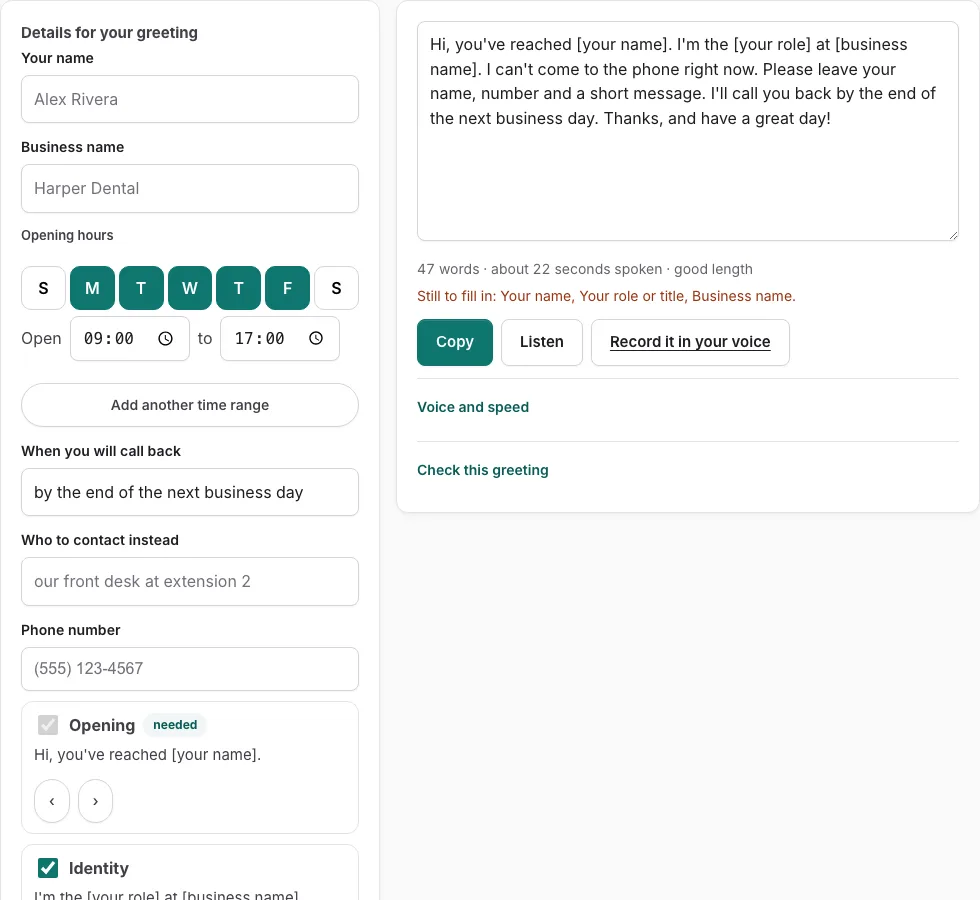
How to use the Voicemail Greeting Script Builder
The builder has eight blocks in a fixed order: Opening, Identity, Situation, Instruction, Callback, Alternative, Emergency and Closing. Each block offers seven wordings.
- Type your name, business, hours, callback time, the person callers can contact instead, and your phone number into the fields. These fill the blanks in the wordings.
- Look at the Opening block. Use its arrow buttons to step through the seven wordings until one fits. Opening is required, so it always stays in the script.
- Check the Identity block, which starts switched on, and choose its wording the same way.
- Choose a wording for the Situation block. It is required, so it always stays in the script.
- Choose a wording for the Instruction block, which is also required.
- Choose a wording for the Callback block, which starts switched on.
- Tick the Alternative or Emergency checkbox only if you want that block. Those blocks start switched off. Then pick its wording with the arrow buttons.
- Pick a wording for the Closing block, which is required.
- Read the finished script in the text box. Edit any line directly if you want to change it.
- Check the word and seconds line, then the checklist score out of 100. Use Listen to hear the script, or Copy to take the text.
The page does not set the greeting on your phone. The how-to pages cover that step.
What is a voicemail greeting script?
A voicemail greeting script is the spoken text you read or record for the message callers hear when you do not answer. It tells them they reached the right person, why you cannot pick up, and what to do next. A good script is short enough to hear through without losing the caller’s interest.
What are the parts of a voicemail greeting script?
A full script has eight parts, and the builder handles each one as its own block. Four blocks are required and always appear. Identity and Callback start switched on, and Alternative and Emergency start switched off. Each block offers seven wordings, which you step through with the arrow buttons. A checkbox switches an optional block on or off.
| Block | Status in the builder | What it covers |
|---|---|---|
| Opening | Required | The first line that tells the caller they reached you |
| Identity | Starts on, can be switched off | Your name and business |
| Situation | Required | Why you cannot answer right now |
| Instruction | Required | How to leave a message |
| Callback | Starts on, can be switched off | When you will return the call |
| Alternative | Starts off, optional | Who the caller can contact instead |
| Emergency | Starts off, optional | What to do if the matter is urgent |
| Closing | Required | A short sign-off |
What are the most important elements to include in a voicemail greeting?
The most important elements are your name, a reason you cannot answer, an instruction to leave a message, and a callback time. The instruction and callback time stop them from calling again or wondering if you received the message. An alternative contact or emergency line covers urgent needs without making you check messages sooner than you can.
How do the fields and checklist work?
The fields (name, business, hours, callback, who to contact instead, phone) fill the tokens in the wordings you choose. The finished script appears in a text box you can edit, with a line below it showing words and estimated seconds. Copy and Listen work as on the generator, and the checklist scores the script out of 100.
Frequently asked questions
How do I personalize my voicemail script?
Type your own name, business, hours, callback time and phone number into the fields. The builder places these details into the wordings you select, so each block reads as your greeting. You can also edit the text box after it is built.
What should a voicemail greeting say?
A greeting should say who you are, why you cannot answer, how the caller can leave a message, and when you will reply. Each of these has its own block in the builder, so you can check that none are missing.
What do you say when you leave a voicemail?
Start with your name and the reason for calling, then leave the details the other person needs to act on, such as a number to call back. Keep it brief so the message is easy to follow. The builder covers the greeting you record, not the message you leave on someone else’s phone.
How often should voicemail greetings be updated?
Update your greeting whenever your availability changes, such as during holidays, vacations, or when your working hours change. An old greeting can send callers the wrong information. Generate a new script with the new hours and callback time, then record it again.
Can I change the script after the builder writes it?
Yes. The finished script is a text box, so you can edit any line before you copy it. The word and seconds line updates to show the effect of your changes, and the checklist score is shown for the text you have.
Can I hear the script before I use it?
Yes. The Listen button reads the finished script aloud so you can check how it sounds. Copy takes the text so you can paste it wherever you need it.
Does the builder set my greeting on my phone?
No. The page does not set the greeting on a phone. Use the how-to pages on this site for the steps to record or set your greeting.
Related tools
- Voicemail Greeting Generator: Use it for greeting scripts for 17 situations.
- What to Say in a Voicemail Greeting: Check Yours: Use it for paste yours and see what is missing.
- Professional Voicemail Greeting Generator: Use it for professional greetings with a checklist.
- How to Record a Voicemail Greeting Online: Use it for record and download a phone-ready WAV.
- Business Voicemail Greeting Generator: Use it for business greetings with spoken hours.
- Personal Voicemail Greeting Generator: Use it for personal greetings for a cell phone.
- Voicemail Greetings: Use it to browse business, personal, holiday, funny and more.