
Voicemail Greeting Ideas
Pick an occasion, copy an opening line you like, then build the full greeting around it.
Free · runs in your browser · nothing is uploaded
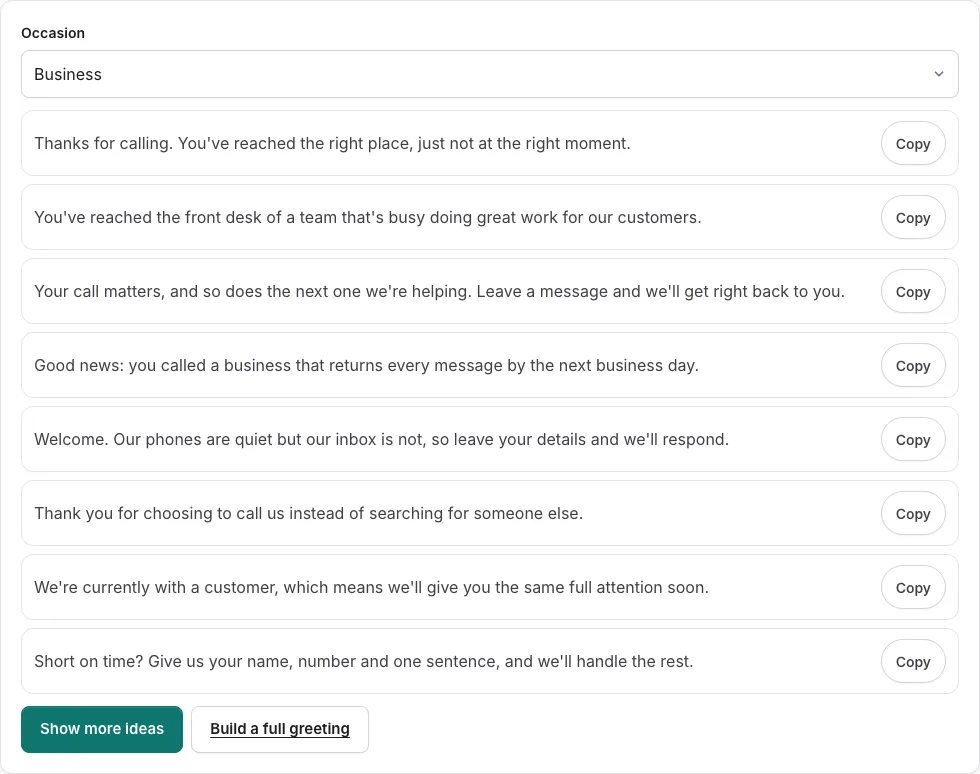
How to use the Voicemail Greeting Ideas tool
The tool holds 112 short opening lines across eight occasions. Follow these steps to find one that fits.
- Click one of the occasion buttons: business, personal, funny, holiday, out of office, student, freelancer or coach. Each button chooses the list of lines you see.
- Read the eight lines that appear. Each one is a hook of six to twenty-five words, not a full greeting.
- Click Show more ideas to rotate to the next eight lines from that occasion.
- When a line suits you, click its Copy button.
- Paste the line into your voicemail greeting, then add your name and any details callers need.
- If you want a complete greeting, click Build a full greeting to open the generator, and use your chosen line as the opening.
Show more ideas gives you a new set of eight from the same occasion, so you can keep looking without changing buttons.
Can I collect lines from different occasions?
Yes. Each line has its own Copy button, so you can collect several lines one at a time and compare them before you record. Try a line from two or three occasions, read each one out loud, and keep the one that sounds most like you. Lines are short hooks, so add your name and details around them. Everything stays on this page, and what you enter is not saved or sent.
Where do greeting ideas come from?
The ideas on this page are 112 short opening lines held by the tool and sorted into eight occasions. They are hooks rather than finished greetings, so each one is meant to open a message that you complete with your own details.
Each occasion is a different situation a caller might be in. Business lines suit work calls, student and coach lines suit people in those roles, and out of office lines suit times when you are away. Choosing the occasion first narrows the list to lines that fit who is calling.
How do I make a funny voicemail?
Start with a light opening line from the funny occasion, then give callers the one detail they need. A joke works best when it is short and followed by clear information.
- Click the funny occasion button and read the eight lines.
- Choose a line that makes you smile and sounds natural when you say it.
- Click Copy, then add your name and the reason you cannot answer.
- Keep the joke to one line so callers reach the important part quickly.
- Use Build a full greeting if you want the joke placed inside a fuller message.
What should you say on your voicemail?
A good greeting names who the caller has reached, says that you cannot answer, and tells them what happens next. Work through the points below in order, and keep each one brief.
- Your name. For work calls, add your business name and department if you have one.
- A short note that you cannot take the call right now.
- When the caller can expect to hear back from you.
- A request to leave their name, number and a short message.
Any line from the tool can serve as the opening sentence, with these points added after it.
Frequently asked questions
What are some good voicemail greetings?
Good greetings are short, clear and easy to follow. Lines from the business and personal occasions are a safe start for most people, and every line in the tool stays within six to twenty-five words.
Where can I find funny voicemail greeting ideas?
Click the funny occasion button to see that list, then use Show more ideas to view the next set. Funny greetings also have a dedicated page at /funny-voicemail-greetings/.
Are there creative voicemail greeting ideas?
The eight occasions do not include a creative label, so compare lines across several occasions such as coach or freelancer. Choose the line with the most personality, then build the rest of the message around it.
How do I personalize my voicemail?
Add your name and a detail about when you will be back, because a hook line on its own is not a complete greeting. Click Build a full greeting to open the generator and fill in those details.
How do I strike the right tone in my voicemail?
Match the occasion to the people who call you: business for work contacts, personal for friends and family. If a joke might confuse a client, pick a plainer line.
What greeting should I use for voicemail?
Pick the occasion that matches why you are unavailable, such as out of office for time away or student for school hours. The line you choose should tell callers who they reached and what to do next.
Why is a personal voicemail message important?
Your greeting is often the first thing a caller hears from you, so it shapes their impression before they leave a message. A personal line helps them know they have reached the right person.
Related tools
- Voicemail Greeting Generator: Use it for greeting scripts for 17 situations.
- Funny Voicemail Greeting Generator: Use it for original funny greetings you can record.
- Voicemail Greeting Examples: Use it for 177 examples you can personalise.
- Voicemail Greeting Script Builder: Use it for build a script block by block.
- Business Voicemail Greeting Generator: Use it for business greetings with spoken hours.
- Personal Voicemail Greeting Generator: Use it for personal greetings for a cell phone.
- How to Record a Voicemail Greeting Online: Use it for record and download a phone-ready WAV.
- Voicemail Greetings: Use it to browse business, personal, holiday, funny and more.