
Voicemail Greeting Generator
Pick the kind of greeting, fill in a few details and get a script you can read aloud, hear, copy or record.
Free · runs in your browser · nothing is uploaded
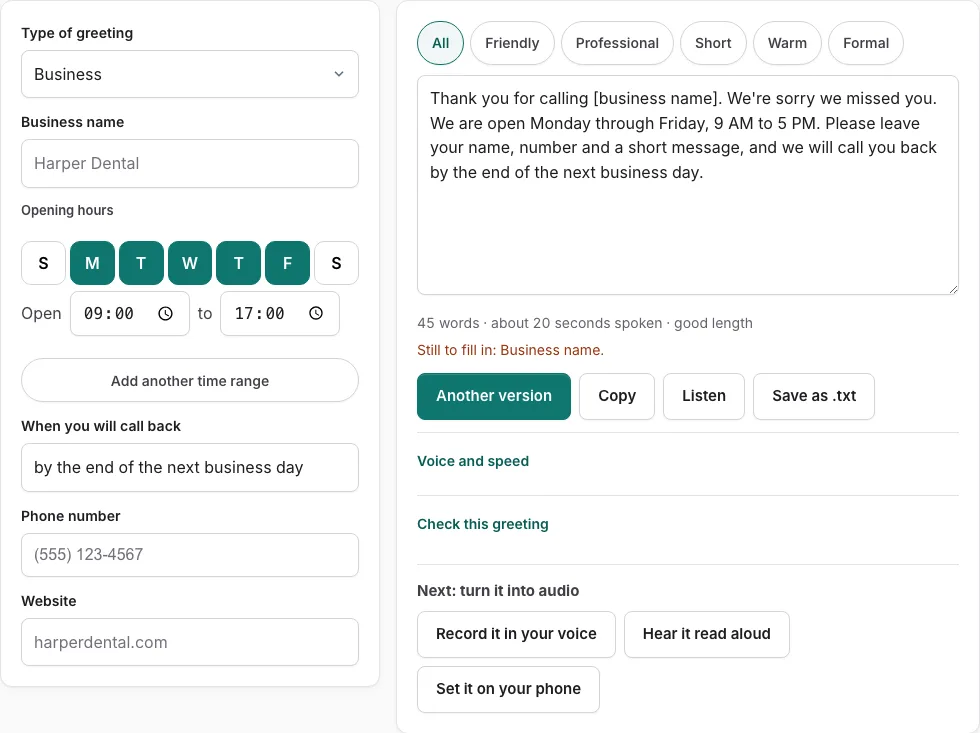
How to use the Voicemail Greeting Generator
- Open the Type of greeting menu and choose a situation, such as Personal, Out of office, or Dental office. The fields change to match the type.
- Fill in the fields on the left. An empty field shows as a bracketed placeholder such as [business name], and a line lists what is still to fill in.
- For business types, use the opening-hours control. Tap the day buttons (S M T W T F S), set an open time and a close time, and add a second or third range, such as a short Saturday. It writes a phrase like “Monday through Friday, 9 AM to 5 PM.”
- Pick a phrase in the “when you will call back” field, such as “within 24 hours,” or type your own.
- Read the script on the right. Press a tone button to filter the versions, or press Another version for a different template of the same type.
- Edit the text by hand if you want. After an edit, field changes are not applied until you press Rebuild from the fields.
- Check the word count and estimated speaking time under the text, then press Check this greeting.
- Press Listen to hear the script read aloud, Copy to copy the text, or Save as .txt to download it.
Press Record it in your voice to open the recorder with the script on screen. The recorder can export a WAV file.
Which type of voicemail greeting do you need?
Choose the type that matches who calls you and why. A personal greeting suits friends and family, a work phone greeting suits colleagues, and an out of office or holiday closure greeting tells callers when you will be back. Business types add opening hours to the script.
| Type | Use it when |
|---|---|
| Personal | Friends and family are your usual callers |
| Work phone | Colleagues and contacts reach you on a work line |
| Professional | Clients or other businesses call you |
| Funny | You want a lighter, casual greeting for personal calls |
| Out of office | You are away from work for a period of time |
| Holiday closure | The office is closed for a holiday |
| After hours | Calls come in outside your opening hours |
| Business types | You run a small business, medical office, dental office, therapist practice, real estate, law firm, insurance agency, restaurant, or contractor business |
For a holiday closure, the menu lists upcoming holidays with the date the office is closed. US federal holidays that fall on a weekend move to Friday or Monday, and the tool works out the first day you are open again.
What is a good greeting message for voicemail?
A good greeting says who the caller has reached, that you cannot pick up, what the caller should do next, and when you will call back. Keep it to about 6 to 30 seconds so callers do not lose patience before they leave a message. The checklist in Check this greeting scores exactly these points.
Check this greeting looks for five things: who answered, why you did not pick up, what to do, when they will hear back, and a length of 6 to 30 seconds. Business types also get a check for opening hours. The line under the script gives an estimate based on 2.4 words per second, plus 0.35 seconds after each sentence and 0.45 seconds for each spoken digit. Treat that number as an estimate, not a measurement, and remember that a phone number read aloud adds time.
Frequently asked questions
How do I create my voicemail greeting?
Choose a type from the Type of greeting menu, fill in the fields, and pick a tone. Then edit the script if you like, run Check this greeting, and copy the text or record it in your voice. The numbered steps above cover each control.
Can AI create a voicemail greeting?
The tool builds the greeting script from its built-in templates and your field entries. Listen reads the script aloud with voices already installed on your device, and the tool does not produce an audio file. To make a recording, use Record it in your voice.
How long should a voicemail greeting be?
Aim for the 6 to 30 seconds that Check this greeting scores. The line under the script shows the word count and an estimated speaking time, so you can adjust the text until it fits. That time is an estimate, so listen to the Listen button before you rely on it.
What should I leave as a voicemail greeting?
Say your name and, for a business line, your company. Then ask the caller to leave their name, their message, and their contact information. The “when you will call back” field adds the timing line for the end of the greeting.
What should an out of office voicemail say?
Say when you will be back, how often you check messages, and who to contact if the matter cannot wait. Choose the Out of office type to start from a script built for this purpose. Then set the call-back field so the timing line matches your return date.
Can I make a voicemail greeting in my own voice?
Yes. Press Record it in your voice to open the recorder with your script on screen, then read it aloud yourself. The recorder can export a WAV file.
Can I make greetings in different languages?
This generator writes English scripts. The Spanish voicemail greeting page has scripts in Spanish, French, German, Brazilian Portuguese and Italian for business, personal, out of office, after hours, holiday and medical greetings.
How do I set up an automated voicemail greeting?
The tool produces the script and, if you record it, the recording. Setting up the greeting on your phone is a separate step done in your phone or service settings, and those settings differ by provider. Copy the text or save the recording first, then follow your provider’s steps.
Related tools
- Business Voicemail Greeting Generator: Use it for business greetings with spoken hours.
- Personal Voicemail Greeting Generator: Use it for personal greetings for a cell phone.
- Voicemail Greeting for Work: Use it for greetings for your own work line.
- Professional Voicemail Greeting Generator: Use it for professional greetings with a checklist.
- Funny Voicemail Greeting Generator: Use it for original funny greetings you can record.
- Out of Office Voicemail Greeting Generator: Use it for out of office greetings with return date.
- How to Record a Voicemail Greeting Online: Use it for record and download a phone-ready WAV.
- Voicemail Greetings: Use it to browse business, personal, holiday, funny and more.