
Voicemail Greeting for Work
Write the greeting for your own work phone: name, role and who to call when you are away.
Free · runs in your browser · nothing is uploaded
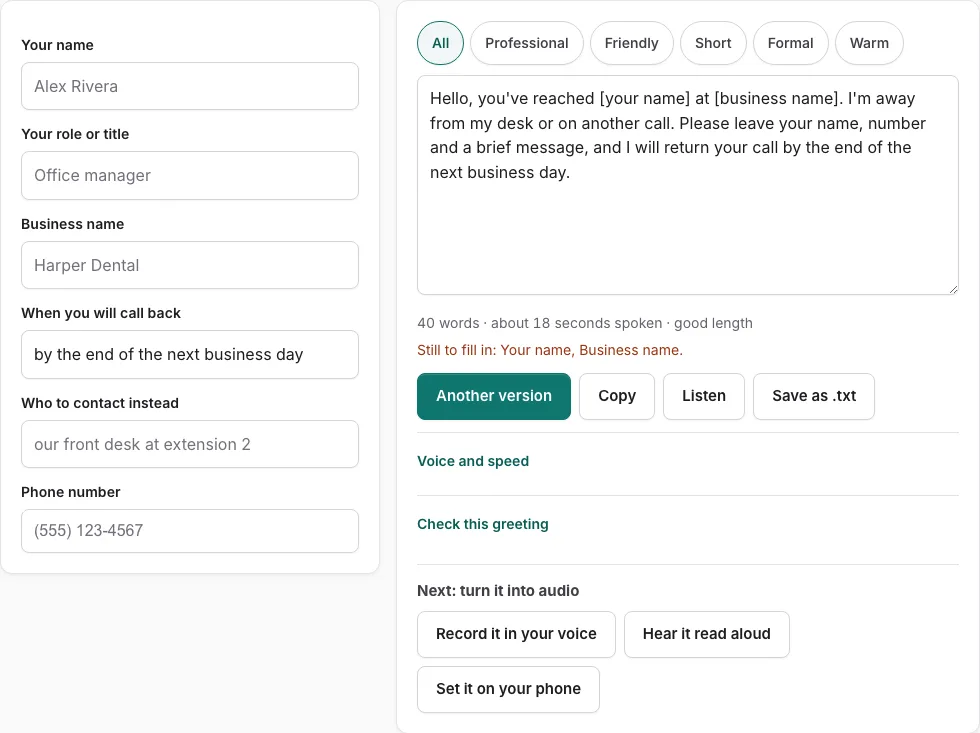
How to use the work voicemail greeting tool
- Type your name in the “your name” field, then add your role.
- Enter your business name in the business field.
- Fill in when you will call back, so callers know what to expect.
- Enter a backup contact in the “who to contact instead” field.
- Type your phone number. When you press Listen, the script reads it back digit by digit.
- Look at the script. A bracketed placeholder such as [business name] marks any empty field, and the line under the text lists what is still missing.
- Press the tone buttons to filter the versions. Press “Another version” to see a different template of the same type, without repeating the current one.
- Edit the script by hand if you want. Once you edit it, field changes are not applied until you press “Rebuild from the fields”.
- Read the word count and estimated speaking time under the text. It is an estimate, not a measurement.
- Press “Check this greeting” to score it against five points: who answered, why you did not pick up, what to do, when they will hear back, and a length of 6-30 seconds.
- Press Listen to hear it, which uses installed device voices and makes no audio file. Then choose Copy, Save as .txt, or “Record it in your voice”.
How do I write a voicemail greeting for my work phone?
A work greeting names you and your role, says why you cannot take the call, gives a time for a return call, and names a backup contact. A company main-line greeting does a different job: it names the business and its hours. Work through the parts below in order, and keep each one to a sentence.
- Open with your business name, then your name and department if you have one.
- Say that you cannot take the call right now, and give a short reason.
- Tell callers when they can expect to hear back from you.
- Give a backup contact for anything urgent.
- Ask callers to leave their name, number, and the reason for their call.
Step 5 is also the answer to what a caller should say: name, number, and reason, in that order.
How do I use the tool to fill in a work greeting?
Fill in the fields on the left and a complete script appears on the right. Empty fields show as bracketed placeholders such as [business name], with a line listing what is still to fill in. Editing the script by hand stops field changes from applying until you press ‘Rebuild from the fields’.
How long should a work voicemail greeting be?
The tool’s length check accepts greetings between 6 and 30 seconds. The word count line shows an estimated speaking time based on the figures below. The estimate is not a measurement, so read the script aloud once to confirm the timing.
| Item | Value used by the tool |
|---|---|
| Length range checked | 6 to 30 seconds |
| Speaking rate assumed | 2.4 words per second |
| Pause added after each sentence | 0.35 seconds |
| Time added per spoken digit | 0.45 seconds |
‘Listen’ reads the script with the speech voices on your device; it does not produce an audio file. ‘Record it in your voice’ opens the recorder with the script on screen.
Phone numbers take longer than most words, so a greeting with a full number read out will run longer than the word count alone suggests.
Frequently asked questions
How often should voicemail greetings be updated?
Update your greeting whenever your availability changes, such as for holidays, vacations, or new working hours. An outdated greeting can send callers to the wrong backup contact or give them a return time you no longer keep.
What should you avoid saying in a voicemail greeting?
Leave out personal details, and avoid promising a callback time you may not meet. Keep the greeting short, because the length check expects between 6 and 30 seconds.
Voicemail greeting for office phone
For a shared office number, use a main-line greeting that names the business and its hours. This tool writes a personal work greeting, so use it for your own extension or direct line.
Voicemail message examples for work
Here is one example for a support lead: “Hi, this is Priya Shah, support lead at Northview Tools. I am away from my desk right now. Please leave your name, number, and reason, and I will call you back by the end of the next working day. For anything urgent, contact [backup contact] at [backup number].”
What do you say when you leave a voicemail?
State your name and the reason for your call, then leave your callback number. Say the number slowly, since callers most often miss the digits.
Related tools
- Business Voicemail Greeting Generator: Use it for business greetings with spoken hours.
- Out of Office Voicemail Greeting Generator: Use it for out of office greetings with return date.
- Professional Voicemail Greeting Generator: Use it for professional greetings with a checklist.
- Voicemail Greeting Script Builder: Use it for build a script block by block.
- Voicemail Greeting Generator: Use it for greeting scripts for 17 situations.
- Personal Voicemail Greeting Generator: Use it for personal greetings for a cell phone.
- How to Record a Voicemail Greeting Online: Use it for record and download a phone-ready WAV.
- Voicemail Greetings: Use it to browse business, personal, holiday, funny and more.