
Voicemail Greeting Examples
Browse every example for a situation. Type your details once and each script updates, ready to copy or hear.
Free · runs in your browser · nothing is uploaded
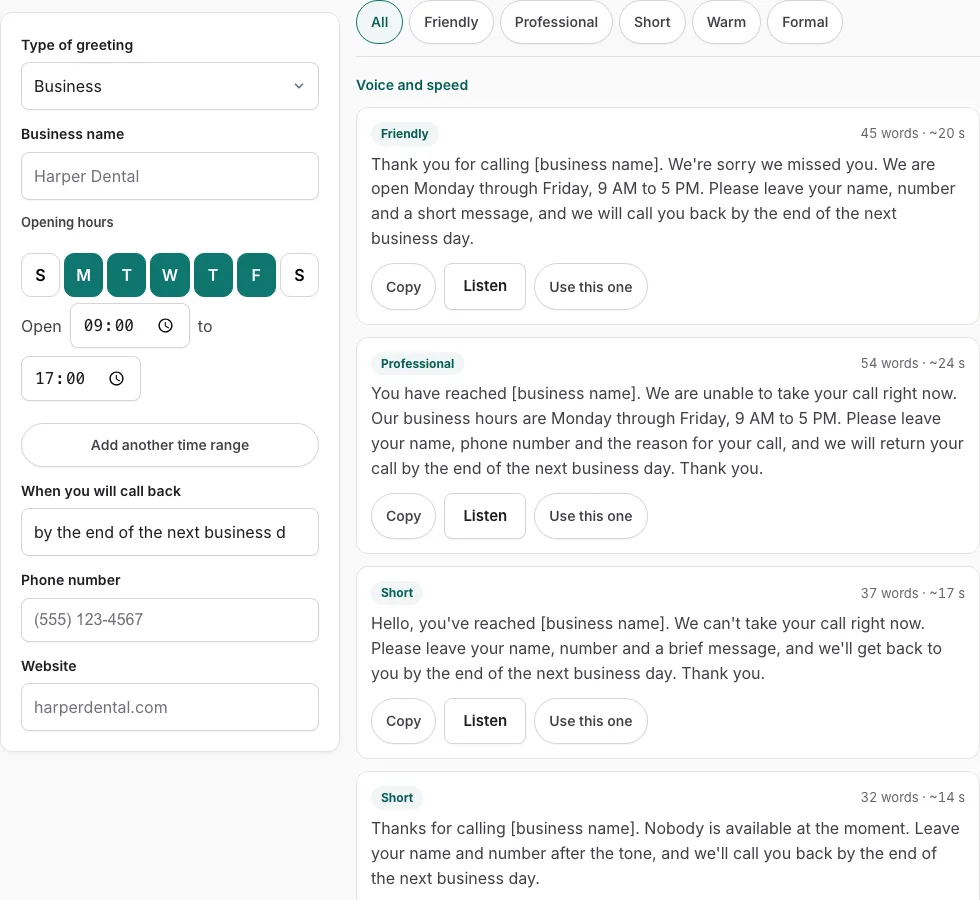
How to use the Voicemail Greeting Generator
- Open the Type of greeting menu and choose the situation that fits, such as a work or personal greeting.
- Type your name, business name, or other details into the fields on the left. Any empty field shows as a bracketed placeholder until you fill it.
- Tap the day buttons (S M T W T F S) in the opening-hours control, then set an open time and a close time. The tool writes a phrase such as “Monday through Friday, 9 AM to 5 PM”. Add a second or third time range for a shorter Saturday.
- Choose a callback phrase such as “within 24 hours” or “as soon as I can”, or type your own text in the ‘when you will call back’ field.
- Tap a tone button to filter the list to the style you want.
- On any card, press Listen to hear it read aloud, Copy to take the text, or Use this one to open that version in the generator for editing.
Listen uses the voices on your device and does not create a file, so if you want a saved recording, record the greeting on your phone yourself. Filling the fields once updates every card, so you never need to edit each example by hand.
What does a good voicemail greeting sound like?
A good voicemail greeting is short, clear and easy to follow. It tells the caller they have reached you, says that you cannot answer right now, and explains when they can expect a reply. It should sound natural, as if you are speaking to one person, rather than like a script read at top speed.
Each card in the list shows a speaking time in seconds, which helps you keep the greeting brief. Pick a tone that suits the line: a plain, calm tone for a work phone and a warmer one for a personal phone. Then fill in the fields so the words sound like you and not like a template. Read the card aloud with Listen before you record, and cut any line that you would skip if a friend said it to you.
What should you say on your voicemail?
Say who the caller has reached, then say what they should expect next. A work greeting usually includes the business name, your name and your department if one applies, and when callers will hear back. This order matches the fields in the tool, so you can work through it top to bottom:
- Give the business name, if the greeting is for work.
- Say your name and department, if one applies.
- Say you are unavailable right now, with a short reason if you want to add one.
- Set your hours with the opening-hours control so callers know when you are reachable.
- Choose a callback time in the ‘when you will call back’ field, such as “by the end of the next business day”.
The list on this page shows all 177 examples in one filterable view. Each one is personalised live with your own name, hours and callback phrase and shows its spoken length in seconds, so you can compare options with your real details already in place. The top results on most pages show only a handful of fixed samples, so this full list gives you far more to choose from.
Frequently asked questions
How do I make a funny voicemail?
Tap the tone buttons to filter the list to humorous versions, then press Listen on the cards to hear which one suits you. If you want a page built around humour, the Funny Voicemail Greeting Generator covers that tone in depth.
How do I personalize my voicemail?
Type your name, business name and other details into the fields on the left. Every card updates at once, and any field you leave empty shows as a bracketed placeholder so you can see what still needs filling in.
What are some good voicemail greetings?
The list holds all 177 English examples across 17 situations, so you can compare styles side by side. Filter by tone, check the speaking time on each card, and use Use this one to edit the version you like best.
How often should voicemail greetings be updated?
Update your greeting whenever your availability changes, such as for holidays, vacations, or new working hours. The opening-hours control and the callback field make these edits quick, so you only change the times or phrase and then record again.
What do you say when you leave a voicemail?
State your name and the reason for your call, then leave a number or another way to reach you. Keep it short so the message is clear and easy to act on.
What are voicemail greeting examples for work?
Choose a work-related situation in the Type of greeting menu, then add your business name, department and hours in the fields. The Business Voicemail Greeting Generator is the page to use if you want work greetings in one place.
Related tools
- Voicemail Greeting Generator: use this to build any greeting from the full list of 177 examples.
- Business Voicemail Greeting Generator: use this when you need a work or office greeting with a business name and hours.
- Personal Voicemail Greeting Generator: use this for a personal or cell phone greeting.
- Funny Voicemail Greeting Generator: use this when you want a humorous greeting.
- Voicemail Greetings: use this to browse greeting ideas before you pick a style.
Related tools
- Voicemail Greeting Generator: Use it for greeting scripts for 17 situations.
- Business Voicemail Greeting Generator: Use it for business greetings with spoken hours.
- Personal Voicemail Greeting Generator: Use it for personal greetings for a cell phone.
- Funny Voicemail Greeting Generator: Use it for original funny greetings you can record.
- Voicemail Greeting for Work: Use it for greetings for your own work line.
- Professional Voicemail Greeting Generator: Use it for professional greetings with a checklist.
- How to Record a Voicemail Greeting Online: Use it for record and download a phone-ready WAV.
- Voicemail Greetings: Use it to browse business, personal, holiday, funny and more.