
Spanish Voicemail Greeting Generator
Choose Español or another language, fill in your details and read the greeting aloud before you record it.
Free · runs in your browser · nothing is uploaded
A Spanish voicemail greeting opens on this page in Spanish, with the same scripts also written in French, German, Brazilian Portuguese and Italian. Fill in the fields on the left and the full greeting appears on the right, ready to listen to, edit, copy, save or record. If you searched for a mensaje de buzón de voz, this is the place to start.
The page opens in Spanish. From the language menu you can also choose English, Français, Deutsch, Português (Brasil) or Italiano. Each of the five non-English languages has scripts for six situations: business, personal, out of office, after hours, holiday and medical office. The fields change with the type of greeting you pick.
Treat the result as a starting point. The scripts were written for this site, so a native speaker should read them before you record.
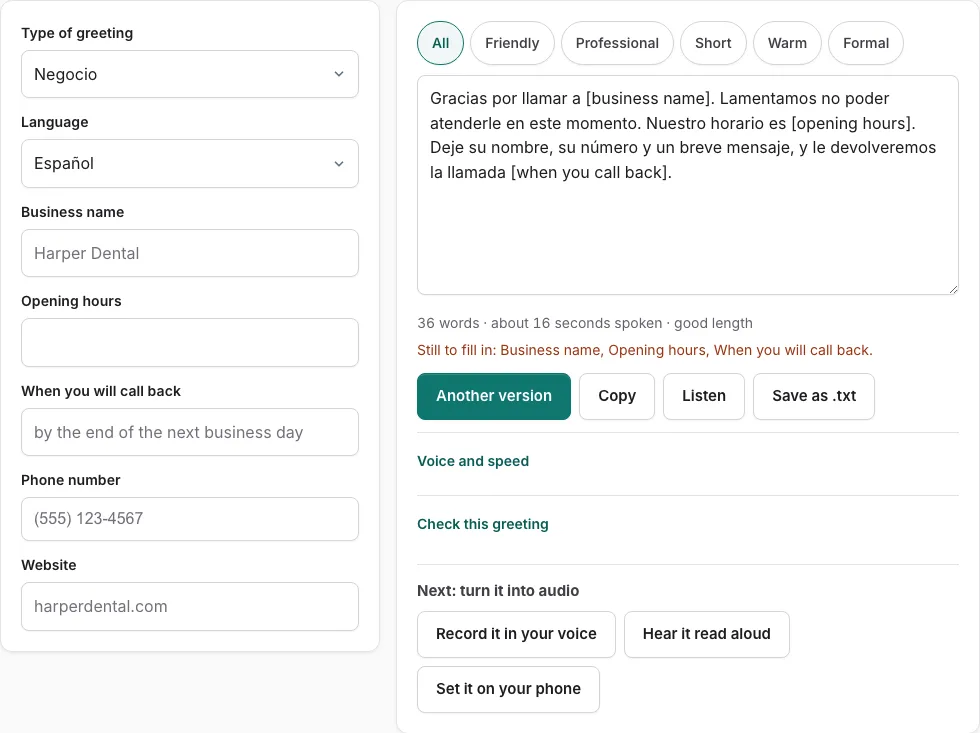
How to use the Spanish voicemail greeting generator
- Open the page, which starts in Spanish. To switch languages, pick one from the language menu.
- Choose the type of greeting: business, personal, out of office, after hours, holiday or medical office.
- Fill in the fields on the left. An empty field shows as a bracketed placeholder such as [business name], and a line lists what is still to fill in.
- Read the script on the right. The line under the text shows the word count and an estimated speaking time in seconds.
- Use the tone buttons to filter the versions. Press ‘Another version’ to get a different template of the same type that does not repeat the current one.
- To edit by hand, change the text box directly. Once you edit it, changes in the fields are not applied until you press ‘Rebuild from the fields’.
- Press ‘Listen’ to hear the script read aloud. Check the Listen voice list, which is filtered to your chosen language and shows how many voices your device has.
- Press ‘Check this greeting’ to score the text.
- Press ‘Copy’, ‘Save as .txt’ or ‘Record it in your voice’, which opens the recorder with the script on screen.
In a non-English language, the opening-hours field is a text box. Type the phrase in that language, because the day buttons use English day names. The ‘when you will call back’ field is also free text there.
Which languages can I use?
You can build scripts in Spanish, French, German, Brazilian Portuguese and Italian, and English is in the language menu too. The page opens in Spanish. Each language also gets emergency wording adapted to it, as the table shows.
The menu lists English, Español, Français, Deutsch, Português (Brasil) and Italiano. There are 155 scripts across the five non-English languages, and each of those languages covers the same six situations.
| Language | Emergency wording in the scripts |
|---|---|
| Spanish | Tells the caller to call the local emergency service, with no number (it is 911 in the United States and Mexico) |
| French | Mentions 15 or 112, the numbers for France (Canada uses 911, Switzerland 144 for an ambulance) |
| German | Mentions 112, the number for Germany and Austria (Switzerland uses 144) |
| Brazilian Portuguese | Mentions SAMU 192, the number for Brazil (Portugal uses 112) |
| Italian | Mentions 112, the number for Italy and the EU |
These are the numbers used in the scripts, and they belong to the countries named in the table. Change them for your own country before you record.
What should a Spanish voicemail greeting include?
A good Spanish voicemail greeting tells the caller who they reached, why you cannot answer, what to do next and when you will call back. The ‘Check this greeting’ button tests five points and a length of 6 to 30 seconds. Business types also get an opening-hours check.
- Who answered
- Why you did not pick up
- What to do
- When they will hear back
- Length of 6 to 30 seconds
If a point is missing, the check shows it, so you can fill the gap in the fields or edit the text.
Voicemail greeting examples in Spanish
Each situation has five or six native-style scripts in Spanish. Pick the situation that fits the call, then use the tone buttons or ‘Another version’ to see other templates of the same type.
| Situation | Use it when |
|---|---|
| Business | Callers reach a company or work line |
| Personal | Callers reach your own phone |
| Out of office | You are away for work or travel |
| After hours | The call comes outside your opening hours |
| Holiday | You are closed for a holiday |
| Medical office | Callers reach a clinic or doctor’s office |
Every language includes all six situations, so the same table applies to French, German, Brazilian Portuguese and Italian.
Frequently asked questions
What does a Spanish voicemail greeting say?
It tells the caller who they have reached, why you cannot answer, what they should do next and when you will call back. The exact wording comes from the fields you fill in and the situation you choose. You can change the text by hand in the script box.
How do I hear the greeting read aloud?
Press ‘Listen’ and the script is read with the speech voices already installed on your device. Phone numbers are read digit by digit. The button does not create an audio file, and if your device has no voice for the language, the browser default voice is used and may sound accented.
How do I edit the script by hand?
The script is a text box, so type your changes straight into it. After you edit, changes in the fields are not applied until you press ‘Rebuild from the fields’. Keep that in mind if you change a field later.
How do I record the greeting in my own voice?
Press ‘Record it in your voice’ to open the recorder with the script on screen. You can read it while you record. Have a native speaker read the script first, as the page advises.
Should a native speaker check the script first?
Yes. The scripts were written for this site, and the page advises that a native speaker should read them before you record. A native reader can catch wording that sounds unnatural for your region or your type of business.
How long should a voicemail greeting be?
Aim for 6 to 30 seconds, which is the length the checker tests for. The line under the script shows the word count and estimated speaking time. The estimate assumes 2.4 words per second, 0.35 s after each sentence and 0.45 s per spoken digit, so treat it as a guide, not a measurement.
Related tools
- Business Voicemail Greeting Generator: Use it for business greetings with spoken hours.
- Personal Voicemail Greeting Generator: Use it for personal greetings for a cell phone.
- Voicemail Greeting Text to Speech: Use it for listen with your device’s voices.
- Voicemail Greeting for Medical Office: Use it for medical greetings with an emergency line.
- Voicemail Greeting Generator: Use it for greeting scripts for 17 situations.
- Voicemail Greeting for Work: Use it for greetings for your own work line.
- How to Record a Voicemail Greeting Online: Use it for record and download a phone-ready WAV.
- Voicemail Greetings: Use it to browse business, personal, holiday, funny and more.