
Voicemail Greeting for Restaurant
Give your hours and address and ask for party size, date and time.
Free · runs in your browser · nothing is uploaded
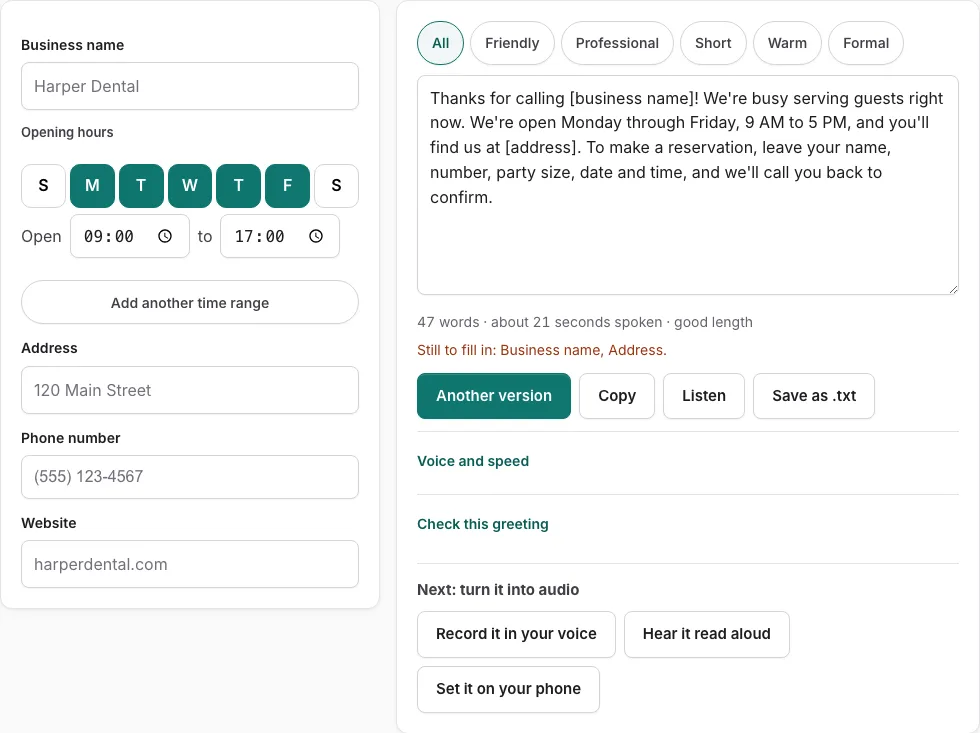
How to use the Restaurant Voicemail Greeting Generator
- Enter your restaurant name in the fields on the left.
- Fill in your hours, address, phone number and website. Any empty field shows as a bracketed placeholder, such as [business name], and a line lists what is still to fill in.
- Read the script on the right.
- Press a tone button to filter the versions. Press ‘Another version’ to see a different template of the same type.
- Edit the text by hand if you want to change the wording.
- Check the word count and estimated speaking time under the text.
- Press ‘Check this greeting’ to score the text against five review points: who answered, why you did not pick up, what to do, when they will hear back, and a length of 6-30 seconds. Business types also get an opening hours check.
- Press ‘Listen’ to hear the script read aloud with the voices installed on your device. Phone numbers are read digit by digit, and no audio file is produced. Or press ‘Record it in your voice’ to open the recorder with the script on screen.
- Press ‘Copy’ to copy the text, or ‘Save as .txt’ to download it.
If you edit the text by hand, changes you make in the fields are not applied until you press ‘Rebuild from the fields’. Keep that in mind before you copy or save.
What should a restaurant voicemail say?
A restaurant voicemail should name the restaurant, state your opening hours, and repeat your street address. It should also tell the caller what to do next, whether that means leaving a name and number or, for reservations, giving party size, date and time. Every one of the 10 scripts on this page states the hours, repeats the street address, and asks reservation callers for those three details. No online booking is implied.
The generator’s check uses five points: who answered, why you did not pick up, what to do, when the caller will hear back, and a length of 6 to 30 seconds. For business types, it also checks opening hours. A greeting that covers all five points is usually a good target.
How do I write a voicemail greeting for a restaurant?
Start with the restaurant name, then add your hours and address, and say what the caller should do next. Keep the finished message within the 6 to 30 second range that the check uses. Read it aloud at a natural pace before you use it.
- Say the restaurant name first, so the caller knows they reached the right place.
- Add your opening hours. If they change by day, name the days.
- Add your street address.
- Tell callers what to do: leave a name and number, or give party size, date and time for a reservation.
- Say when you will call back.
- Time the greeting. The tool estimates speaking time from 2.4 words per second, plus 0.35 seconds after each sentence and 0.45 seconds per spoken digit. It is an estimate, so read it aloud to confirm.
How do I edit the script and use the fields?
Fill in the fields on the left and the script appears on the right. Once you edit the script by hand, changes in the fields are not applied until you press ‘Rebuild from the fields’.
| Control | What it does |
|---|---|
| Tone buttons | Filter the versions |
| Another version | Shows a different template of the same type |
| Listen | Reads the script aloud with installed voices, digit by digit for phone numbers |
Frequently asked questions
Should I update the greeting daily?
No. Update the greeting when your hours change, before holidays, and for special events. A greeting with accurate hours can stay as it is between those changes.
What kinds of greetings can I create?
The page offers 10 versions of restaurant greetings, and the fields you see depend on the type of greeting you choose. Tone buttons filter the versions to the style you prefer. If you want a different wording for the same kind of greeting, press ‘Another version’ to get a new template without repeating the current one.
Should I take reservations by voicemail?
The scripts ask reservation callers for party size, date and time, so you can collect those details by voicemail. The tool does not show any online booking option. If you take bookings through an online reservation system, you can mention it in your greeting so callers know where to go.
What if I want to change my greeting later?
Fill in the fields again with the new details, or edit the text by hand. If you edited the text and now want your field changes applied, press ‘Rebuild from the fields’. The text is not stored, so copy it or save it as a .txt file before you leave the page.
Related tools
- Voicemail Greeting for Small Business: Use it for for owner-run shops and studios.
- After-Hours Voicemail Greeting Generator: Use it for after-hours greetings with spoken hours.
- Holiday Voicemail Greeting Generator: Use it for holiday greetings with reopening date.
- Business Voicemail Greeting Generator: Use it for business greetings with spoken hours.
- Voicemail Greeting for Medical Office: Use it for medical greetings with an emergency line.
- Voicemail Greeting for Dental Office: Use it for dental greetings with emergency number.
- Voicemail Greeting Generator: Use it for greeting scripts for 17 situations.
- Voicemail Greetings by Industry: Use it to browse medical, dental, law, real estate, trades.