
Voicemail Greeting for Real Estate Agent
Ask callers for the property address and a good time to reach them.
Free · runs in your browser · nothing is uploaded
A voicemail greeting for a real estate agent works best when it asks for the property address and a good time to call, so the ten versions here do exactly that. Fill in your name, brokerage or team, phone number, website, and when you will call back, and a complete script appears on the right. The page has 10 versions, so you can pick the one that fits your style and edit the wording by hand.
Many agents miss calls from buyers, sellers, and past clients because the greeting says nothing useful. A good greeting tells the caller who they reached, why you may not have answered, and what to do next. This tool builds that structure for you, then shows a word count and estimated speaking time so you can keep the message short.
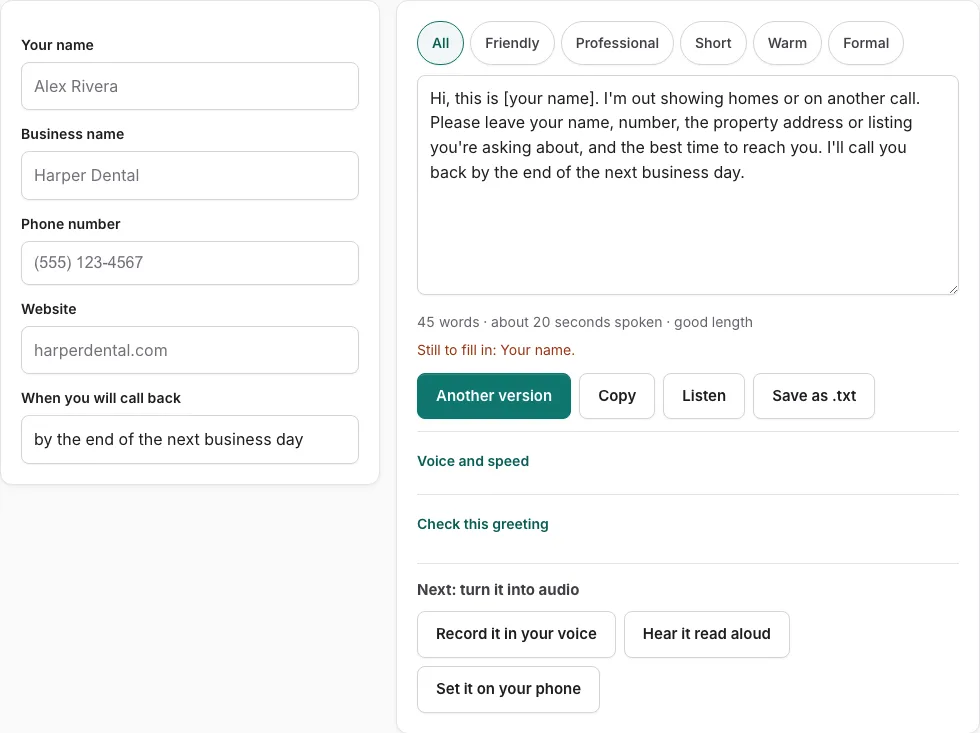
How to use the real estate voicemail greeting tool
- Fill in your name, brokerage or team, phone, website, and when you will call back in the fields on the left. Any empty field shows as a bracketed placeholder such as [business name], and a line below the fields lists what is still missing.
- Read the script on the right. Use the tone buttons to filter the versions, or press Another version to see a different template of the same type without repeating the current one.
- Edit the text by hand if you want to change a word or sentence. Once you edit it, changes in the fields are not applied until you press Rebuild from the fields.
- Check the line under the text for the word count and estimated speaking time in seconds.
- Press Check this greeting. It scores the script on five points: who answered, why you did not pick up, what to do, when they will hear back, and a length of 6 to 30 seconds.
- Press Listen to hear the script read aloud with the voices on your device. Phone numbers are read digit by digit.
- Press Copy to copy the text, Save as .txt to download it, or Record it in your voice to open the recorder with the script on screen.
Use Another version whenever a template does not sound like you. Each new version keeps the same type of greeting, so your details stay in the right places.
What should a realtor’s voicemail say?
A realtor’s voicemail should give your name and brokerage, say why you are calling, tell the caller when you will call back, and end with one clear request. Keep it short enough to finish in a few seconds. The tool’s checker uses 6 to 30 seconds as its length target.
Your name and brokerage confirm the caller reached the right person. A short reason, such as being with a client or out at a showing, stops callers from wondering whether you ignored them. The callback time sets an expectation, and the call to action tells the caller what to do, such as leaving a number or visiting your website. The scripts do not include licence numbers or fair-housing statements, so add whatever your state or brokerage requires.
How do I create the best realtor voicemail script?
Start with the fields, then choose the version whose tone fits how you work. Fill in your name, brokerage or team, phone, website, and callback time, read the result, and run Check this greeting. Edit the wording by hand, then save or record it.
‘Another version’ shows a different template of the same type without repeating the current one. The word count line estimates speaking time at 2.4 words per second plus pauses. If you edit the script by hand, press ‘Rebuild from the fields’ before changing the fields, or your changes will not apply. ‘Listen’ reads the script aloud with your device’s installed voices and reads phone numbers digit by digit.
Pick a tone that sounds like you on a phone call. A formal tone suits a large brokerage, while a warmer one may suit a small team that works with local families. Keep the callback time specific, because callers who know when you will reply are less likely to call again. If you work mostly with listings, the scripts mention showings, and you can point callers to your listings through the website field. After you record, play the file back once and cut any sentence that repeats a point.
Frequently asked questions
What makes the best real estate agent voicemail greeting?
The best greeting names you and your brokerage, gives a brief reason for missing the call, and says when you will call back. It also asks for one action, and it stays within the 6 to 30 second range the checker uses. Press Check this greeting to see where your script falls short.
How do I create a voicemail greeting?
Enter your details in the fields on the left, and the complete script appears on the right. Edit the text if you want changes, then press Copy, Save as .txt, or Record it in your voice.
Can I customize my voicemail message?
Yes. The script is a text box you can edit by hand, and the tone buttons and Another version let you switch to a different template. If you change the fields after editing, press Rebuild from the fields to apply them.
What if I need to change my greeting later?
Update the fields and press Rebuild from the fields, or edit the text directly. The tool does not store your text, so keep a copy with Save as .txt or Copy if you want to reuse the old version.
Does the tool include scripts for showings and listings?
Yes, the 10 versions on this page mention showings, and the website field lets you point callers to your listings. Choose a version that fits the calls you miss most often.
Related tools
- Voicemail Greeting for Small Business: Use it for for owner-run shops and studios.
- Voicemail Greeting for Insurance Agent: Use it for greetings with a claims line.
- Professional Voicemail Greeting Generator: Use it for professional greetings with a checklist.
- Voicemail Script Generator: What to Say When You Leave One: Use it for scripts for messages you leave.
- Voicemail Greeting for Medical Office: Use it for medical greetings with an emergency line.
- Voicemail Greeting for Dental Office: Use it for dental greetings with emergency number.
- Voicemail Greeting Generator: Use it for greeting scripts for 17 situations.
- Voicemail Greetings by Industry: Use it to browse medical, dental, law, real estate, trades.