
Professional Voicemail Greeting Generator
Choose a formal or friendly script, add your details and see how it scores before you record it.
Free · runs in your browser · nothing is uploaded
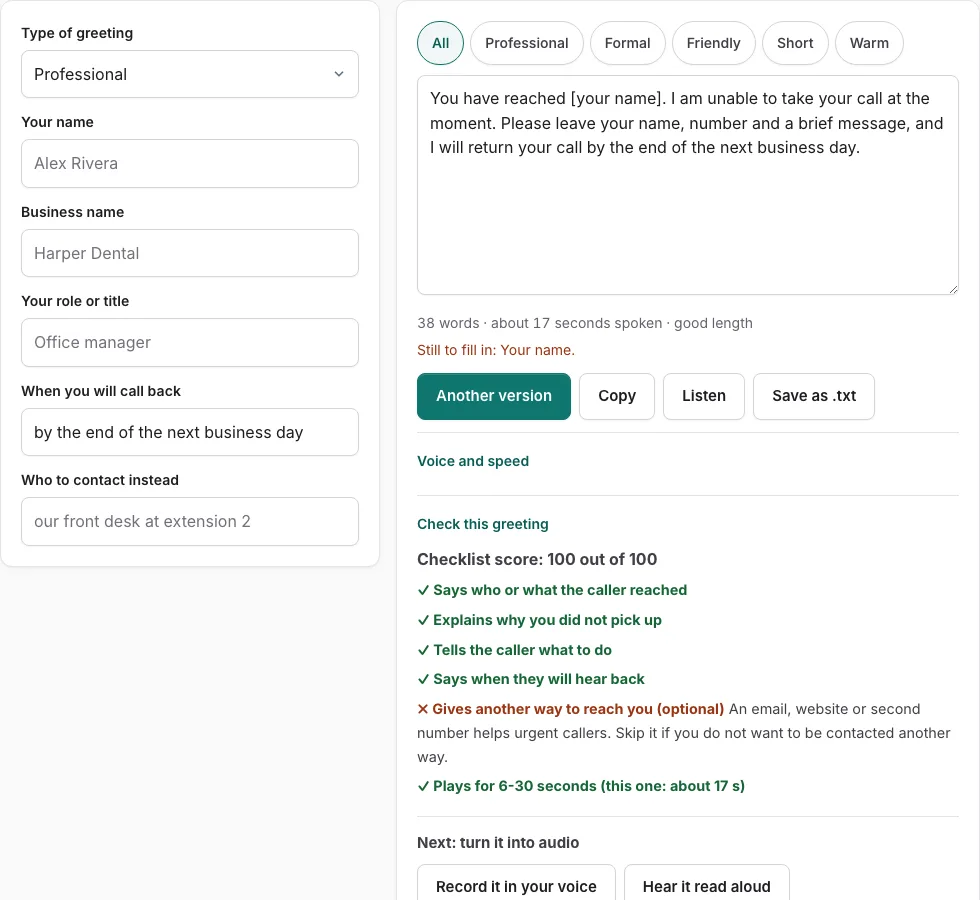
How to use the professional voicemail greeting tool
- Fill in the fields on the left. They change with the type of greeting, so complete the ones that apply to you. An empty field shows as a bracketed placeholder such as [business name], and a line under the form lists what is still to fill in.
- Read the script on the right. It appears once the fields are filled.
- Press a tone button to filter the versions to the tone you want.
- Press ‘Another version’ to see a different template of the same type. It will not repeat the version you are looking at.
- Edit the wording by hand in the text box if needed. After a manual edit, changes in the fields are not applied until you press ‘Rebuild from the fields’.
- Check the word count and estimated speaking time shown under the text.
- Press ‘Listen’ to hear the script read aloud with the voices already installed on your device. Phone numbers are read digit by digit. This does not produce an audio file.
- Look at the ‘Check this greeting’ panel, which opens by default on this page. Fix any point it marks as missing, and it updates as you edit.
When the script is ready, press ‘Copy’ to copy the text, ‘Save as .txt’ to download it, or ‘Record it in your voice’ to open the recorder with the script on screen. The text is not stored.
What is a professional voicemail greeting?
A professional voicemail greeting is the short recorded message a caller hears when you cannot answer. It tells them who they reached, why the call went to voicemail, and what to do next, in a calm and polite tone. Callers hear it at a moment of uncertainty, so the first few sentences matter most. A clear greeting keeps the caller on the line long enough to leave a useful message.
How do I write a professional voicemail greeting?
Write your greeting in five parts: say who the caller reached, explain why you did not pick up, tell the caller what to do, say when they will hear back, and keep the recording between 6 and 30 seconds. The check panel looks for each part, so it shows you which one is missing.
- Say who the caller reached. Name your business or your own name, so the caller knows they are in the right place.
- Explain why you did not pick up. A short reason, such as being with another client or away from the desk, is enough.
- Tell the caller what to do. Give one clear next step, such as leaving a message after the tone.
- Say when they will hear back. Name a timeframe you can keep.
- Keep it between 6 and 30 seconds. Use the estimated speaking time under the text to check the length.
Each part answers a question the caller has at that moment: who is this, did I reach the right place, why no answer, what now, and when. Business greetings also need opening hours, which the check looks for. Contact details are an optional extra.
The check uses keyword matching. It confirms that each point is present, but it does not judge tone or grammar, so read the greeting aloud once before you record it.
Frequently asked questions
Professional voicemail greeting script
The tool builds a complete professional voicemail greeting script from the fields you fill in on the left. Tone buttons filter the versions, and ‘Another version’ gives you a different template of the same type without repeating the current one. You can then edit the text by hand, copy it, or save it as a .txt file.
How do I personalize my voicemail?
Fill in the fields on the left with your own details, such as your business name and the reason you may be unavailable. Once a field has a value, it replaces its bracketed placeholder in the script. If you edit the text by hand, press ‘Rebuild from the fields’ to bring in later changes to the fields.
What should you say on your voicemail?
Start with who the caller reached, such as your company and your own name. Then give a short reason you missed the call, tell callers what to do next, and say when they can expect a reply. If you are leaving a voicemail for someone else, open with who you are, then state the purpose of the call.
What are some good voicemail greetings?
Begin with one of the versions the tool writes, since each follows a template for your greeting type. Use the tone buttons to filter versions, then press ‘Another version’ to compare a different template. Keep the one that reads naturally and passes every point in the check panel.
What to include in a professional voicemail greeting?
The essentials are who the caller reached, why you missed the call, what the caller should do, and when you will reply. Business greetings should also include opening hours, and contact details are an optional extra. Keep the whole recording between 6 and 30 seconds, which is the length the check uses.
What does the ‘Check this greeting’ panel look at?
The panel checks five points: who or what the caller reached, why you did not pick up, what the caller should do, when they will hear back, and whether the greeting plays for 6 to 30 seconds. Business types also check for opening hours. It is a keyword-based check, so it does not judge tone or grammar.
How is the speaking time calculated?
The estimate assumes 2.4 words per second, plus 0.35 seconds after each sentence and 0.45 seconds per spoken digit. It is an estimate, not a measurement. Use it to see whether your greeting falls within the 6 to 30 second range before you record.
Related tools
- Business Voicemail Greeting Generator: Use it for business greetings with spoken hours.
- What to Say in a Voicemail Greeting: Check Yours: Use it for paste yours and see what is missing.
- Voicemail Greeting Script Builder: Use it for build a script block by block.
- Voicemail Greeting Examples: Use it for 177 examples you can personalise.
- Voicemail Greeting Generator: Use it for greeting scripts for 17 situations.
- Personal Voicemail Greeting Generator: Use it for personal greetings for a cell phone.
- How to Record a Voicemail Greeting Online: Use it for record and download a phone-ready WAV.
- Voicemail Greetings: Use it to browse business, personal, holiday, funny and more.