
Personal Voicemail Greeting Generator
Add your name and get a short, friendly greeting for your own cell phone.
Free · runs in your browser · nothing is uploaded
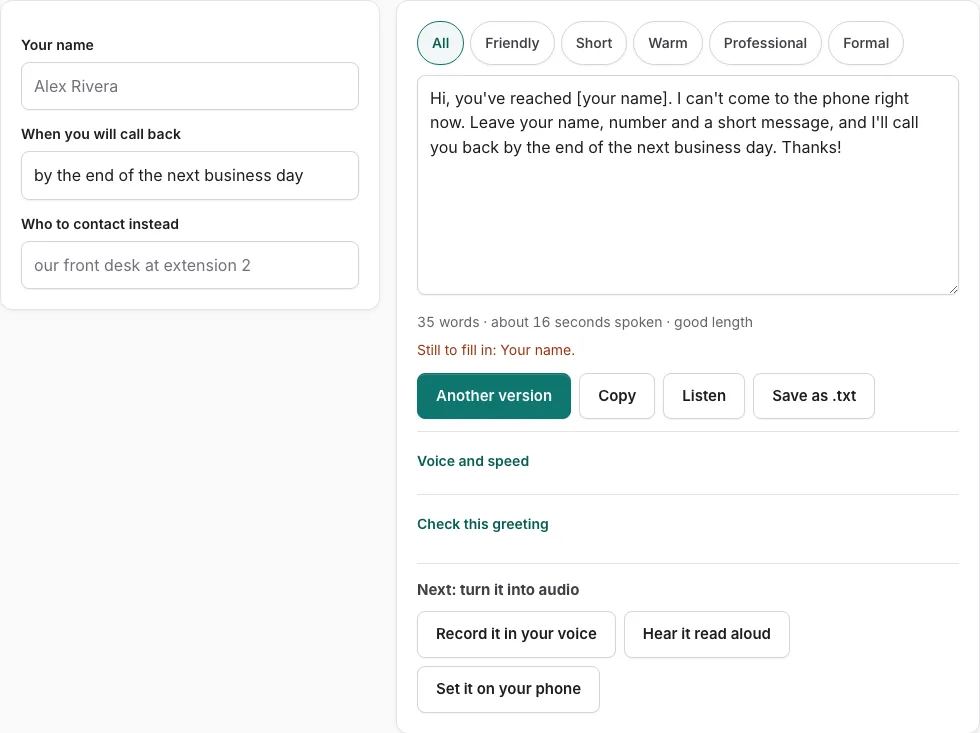
How to use the personal voicemail greeting tool
- Type your name in the “your name” field.
- Enter when you will call back, such as later today or tomorrow morning.
- Enter who to contact instead, if someone can help the caller in the meantime. Leave it empty if no one can.
- Read the script on the right. Any field you left empty shows as a bracketed placeholder, such as [your name], and a line under the fields lists what is still to fill in.
- Press a tone button to filter the versions, then press “Another version” to see a different template of the same type.
- Check the word count and the estimated seconds under the text. Keep the greeting under 15 seconds.
- If you edit the script by hand, press “Rebuild from the fields” after you change a field, because your typed changes are not applied otherwise.
- Press “Check this greeting” to score the text against the five points it looks for.
- Press “Listen” to hear it read aloud, or use “Copy”, “Save as .txt”, or “Record it in your voice” to keep it.
“Listen” uses the speech voices already installed on your device and reads phone numbers digit by digit. It does not create an audio file, so use “Record it in your voice” if you want your own recording.
How long should a personal voicemail greeting be?
A personal voicemail greeting is usually between six and fifteen seconds long. The tool’s estimate is based on a speaking rate of 2.4 words per second, plus 0.35 seconds after each sentence and 0.45 seconds per spoken digit. It is an estimate, not a recording, so treat the number as a guide.
| Measure | Value |
|---|---|
| Common length for a personal greeting | 6 to 15 seconds |
| Length the greeting check accepts | 6 to 30 seconds |
| Speaking rate in the estimate | 2.4 words per second |
| Pause added after each sentence | 0.35 seconds |
| Time added per spoken digit | 0.45 seconds |
The greeting check accepts anything from 6 to 30 seconds, so a greeting in the common range meets the length point.
What should I say in a personal voicemail greeting?
A good personal greeting says your name, makes clear the caller has reached your phone, and tells them what to do next. Those three parts are enough for most people, and the tool builds them into every version.
- Your name, so the caller knows they have the right number.
- A short line saying you cannot pick up right now.
- When you will call back, or who to contact instead.
- A request to leave a name and number after the tone.
The page has 10 personal versions. Use the tone buttons to filter them, or press ‘Another version’ to see a different template of the same type without repeating the current one.
The fields are your name, when you will call back, and who to contact instead. Fill them in on the left and the script on the right updates. Any empty field shows as a placeholder such as [your name], and a line lists what is still to fill in. Once you edit the script by hand, field changes are not applied until you press ‘Rebuild from the fields’.
Personal callers do not need your opening hours, so the tool does not ask for them. Keep the greeting to the points above and skip anything that adds seconds without helping the caller.
Frequently asked questions
Should you say your name in your voicemail?
Yes. Saying your name at the start lets callers confirm they have the right number. The “your name” field fills it into every version of the script.
What are some good voicemail greetings?
A good greeting is short and friendly, for example: “Hi, you’ve reached [your name]. I can’t get to my phone right now. Leave your name and number, and I’ll call you back [when].” Use the tone buttons to swap in a warmer or more formal version.
Voicemail greeting for personal cell phone
A personal cell phone greeting should be brief, usually between six and fifteen seconds, and sound like you. This tool gives you 10 personal versions, so you can pick the tone that suits your friends and family.
Is there a voicemail message sample for personal use?
Yes. The script on the right is a finished sample built from your fields, and you can edit it by hand. Press “Listen” to hear how it sounds before you save it.
How do I make a funny voicemail?
This page covers personal greetings, which are kept plain and friendly. For playful lines and jokes, use the Funny Voicemail Greeting Generator linked below.
What makes a voicemail greeting cute?
Warmth and brevity do most of the work. A short, friendly line that sounds like you usually works better than a long joke, and the tool’s seconds line helps you keep the greeting under 15 seconds.
Can I record my own voicemail greeting?
Yes. Press “Record it in your voice” to open the recorder with the script on screen, then read it aloud. Record it in a quiet place so the callback time and your name are clear.
Related tools
- Funny Voicemail Greeting Generator: Use it for original funny greetings you can record.
- Voicemail Greeting for Work: Use it for greetings for your own work line.
- Voicemail Greeting Ideas: Use it for opening lines for eight occasions.
- How to Record a Voicemail Greeting Online: Use it for record and download a phone-ready WAV.
- Voicemail Greeting Generator: Use it for greeting scripts for 17 situations.
- Business Voicemail Greeting Generator: Use it for business greetings with spoken hours.
- Voicemail Greetings: Use it to browse business, personal, holiday, funny and more.