
Out of Office Voicemail Greeting Generator
Add your return date and who covers for you to get a clear out of office voicemail greeting.
Free · runs in your browser · nothing is uploaded
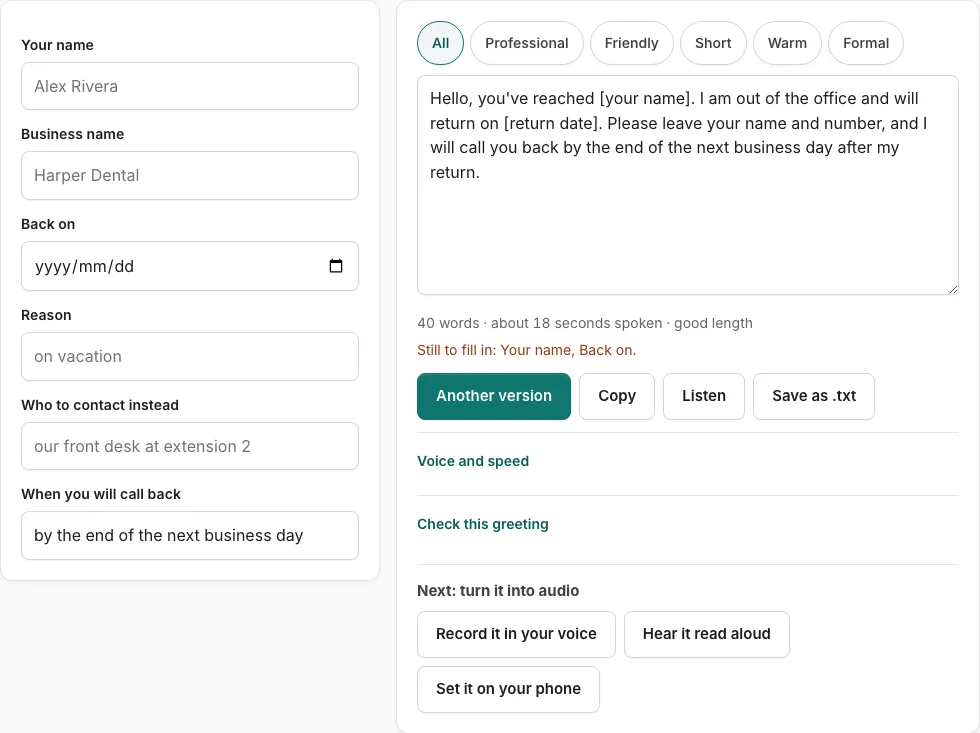
How to use the Out of Office Voicemail Greeting Generator
- Choose a version from the 10 on the page. The fields on the left depend on the type of greeting you pick.
- Type your name and business. Any empty field shows as a bracketed placeholder such as [business name], and a line under the fields lists what is still to fill in.
- Enter the reason, either typed or picked from the list, for example on vacation.
- Fill in who to contact instead and when you will call back.
- Use the return date picker. It turns the date into spoken words such as “Thursday, November 26th”.
- Read the script on the right. Use the tone buttons to filter versions, or press Another version for a new template.
- To edit the text yourself, type in the script box. Once you edit it, changes in the fields are not applied until you press Rebuild from the fields.
- Check the word count and estimated speaking time under the text, then press Check this greeting.
- Press Listen to hear the script read aloud, Copy it, Save as .txt, or press Record it in your voice to read it on screen while you record.
The page does not change the greeting for you when you return, so switch back to your normal greeting on the day you are back. This tool covers voicemail only. The email out of office message is a different tool and is not offered here.
What should an out of office voicemail say?
An out of office voicemail should tell the caller who they reached, that you are away, when you will be back, and what to do in the meantime. It should also say when they will hear back from you. The check on this page looks for each of these points, so the table below lists them in the order a caller needs them.
| Part | What to say | Sample line |
|---|---|---|
| Who answered | Your name and business | “You have reached Dana Ruiz at Ruiz Bakery.” |
| Why you are away | The reason, typed or picked | “I am on vacation this week.” |
| Return date | The date from the picker | “I am back Thursday, November 26th.” |
| What to do | A backup contact | “For urgent orders, call [backup name] at [number].” |
| When they will hear back | Your callback promise | “I will return your message when I am back.” |
Keep the full greeting between 6 and 30 seconds, the range the check uses.
Out of office voicemail message examples for vacation
A vacation greeting names you, gives the date you return, points to a backup, and promises a reply. Adapt this sample by replacing the names, business and number:
“Hi, you’ve reached Sam Okafor at Okafor Design. I am on vacation until Monday, March 3rd, and I am not checking voicemail until then. For urgent project questions, please call Priya Shah at [number]. I will return your message when I am back.”
Out of office voicemail message examples for holidays
A holiday greeting uses the same parts, but the reason is the closure and the return date is the day regular hours resume. Keep it short so callers hear the key dates first:
“Thanks for calling Okafor Design. We are closed for the holidays and reopen Thursday, November 26th. If your request cannot wait, leave your name and number and we will call you back when we reopen.”
Frequently asked questions
Should I name a colleague in my greeting?
Naming a colleague helps when someone else takes calls while you are away. Enter that person in the who to contact instead field, and their name and number appear in the script.
What’s a good short out of office message?
A short greeting keeps only the name, the reason, the return date and a backup contact. Check the timing line under the script, then press Check this greeting to confirm it falls within the 6 to 30 second range.
How do I create a professional voicemail greeting?
Choose a version, fill in every field on the left, and the complete script appears on the right. Edit the text by hand if you want a personal touch, then use Check this greeting before you save the script.
How do I record a greeting quickly before leaving?
Press Record it in your voice. The recorder opens with your script on screen, so you read it straight through instead of composing it on the spot. Review the word count and timing first so your recording stays concise.
Do I need to update the greeting daily during a long absence?
No. A single greeting can cover the whole trip, since the return date and backup contact stay the same. Only change it back when you return.
Should I include my return date in an out of office voicemail?
Yes, add it whenever you know the date. The return date picker speaks the date in words, such as “Thursday, November 26th”, so callers hear it clearly.
How do I professionally leave a voicemail?
Start with your name and a callback number, then state the reason for your call in one sentence. Add only the details the other person needs to act, and speak clearly enough that the number is easy to write down.
Related tools
- Holiday Voicemail Greeting Generator: Use it for holiday greetings with reopening date.
- Voicemail Greeting for Work: Use it for greetings for your own work line.
- After-Hours Voicemail Greeting Generator: Use it for after-hours greetings with spoken hours.
- Business Voicemail Greeting Generator: Use it for business greetings with spoken hours.
- Voicemail Greeting Generator: Use it for greeting scripts for 17 situations.
- Personal Voicemail Greeting Generator: Use it for personal greetings for a cell phone.
- How to Record a Voicemail Greeting Online: Use it for record and download a phone-ready WAV.
- Voicemail Greetings: Use it to browse business, personal, holiday, funny and more.