
New Year's Voicemail Greeting Generator
Generate tailored New Year's holiday voicemail greetings that welcome the new year and state your exact January reopening schedule.
Free · runs in your browser · nothing is uploaded
How to generate a New Year’s voicemail greeting
Follow these simple instructions to create an uplifting, professional New Year greeting with accurate January dates.
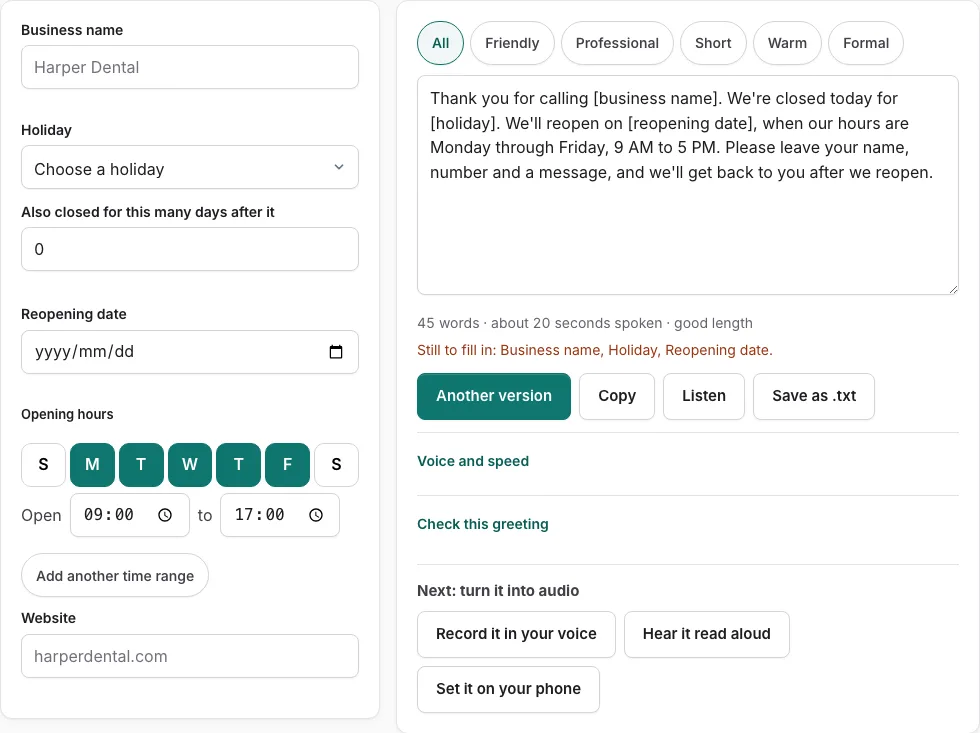
- Open the generator above and select New Year’s Day from the holiday dropdown menu.
- Enter your company or business name in the designated input field.
- Set your standard business operating days so the calculator can accurately determine your next open day.
- If your company stays closed for additional inventory or planning days, adjust the “Also closed for this many days after it” selector.
- Confirm that the calculated reopening date reflects your exact January return schedule.
- Choose a tone filter (Warm, Professional, Friendly, or Short) to explore script variations.
- Click “Listen” to review the speech playback and check that the estimated seconds fit your telephone system.
- Click “Check this greeting” to verify script length and callback instructions.
- Click “Copy” to copy the text to your clipboard or “Save as .txt” to download the file.
- Record the message into your phone system on New Year’s Eve so incoming holiday callers receive immediate guidance.
Recording recommendations
Maintain an upbeat, professional tone and enunciate calendar numbers carefully. Test the recording with our Listen button to verify that the message duration comfortably fits within 25 seconds.
When should I update my New Year voicemail greeting?
Plan to activate your New Year’s voicemail greeting on the afternoon of New Year’s Eve (December 31), or earlier if your office observes an extended year-end break. This ensures callers dialing on New Year’s Eve and New Year’s Day receive an up-to-date message reflecting the holiday schedule.
On your first day back in January, replace the holiday greeting with your standard business greeting early in the morning so normal incoming calls are greeted without holiday references.
Planning for annual inventory and early January planning
Many companies use early January for inventory counts, corporate restructurings, or staff retreats:
- New Year’s Day Observance: When January 1 falls on a Sunday, the federal holiday is observed on Monday, January 2. Our tool automatically accounts for this shift so your greeting states the correct Tuesday return date.
- Inventory Count Closures: If your warehouse or retail operation is closed for physical inventory counting during the first week of January, indicate that orders will begin shipping once counting concludes.
- Digital Self-Service: Point clients to your online knowledge base, client portal, or customer service email for inquiries that can be resolved without waiting for phone lines to reopen.
| Schedule Scenario | Holiday Window | Spoken Reopening Announcement |
|---|---|---|
| Single Holiday Closure | January 1 only | “We will reopen tomorrow at normal business hours” |
| Weekend Observed Shift | Jan 1 on Sunday, observed Jan 2 | “We will reopen on Tuesday morning, January 3” |
| Extended New Year Weekend | Dec 31 through Jan 3 | “Our office will resume normal operations on Monday” |
| New Year Inventory Week | Closed first 3 days of January | “Shipping and phone support will resume on Thursday” |
Writing an uplifting and informative New Year greeting
An effective New Year greeting establishes a welcoming tone while setting realistic response times:
- Enthusiastic greeting: Wish callers a happy, healthy, and prosperous new year.
- Accurate reopening date: Explicitly state the date and day of the week your staff resumes normal phone support.
- Clear instructions: Ask callers to leave their contact details, order number, and preferred callback time so your team can triage messages efficiently.
Preparing team workflow for January return
When reopening after the New Year holiday, call volume is often higher than average. Having a clear greeting that prompts callers for account numbers and order IDs allows your team to triage incoming voicemails efficiently on morning one.
Coordinated calendar reminders for greeting removal
Set a digital calendar reminder for 8:00 AM on your first morning back in January to switch your telephone greeting back to your standard business greeting, ensuring customers receive current operating hours.
Frequently asked questions
When should I record a New Year’s voicemail greeting?
Record and upload your greeting before leaving the office on New Year’s Eve afternoon (December 31) so callers throughout the holiday weekend receive the updated schedule.
What if January 1 falls on a Saturday or Sunday?
When January 1 falls on a Saturday, federal offices observe Friday, December 31; when it falls on a Sunday, Monday, January 2 is observed. Our calculator updates the return date automatically.
How long should a New Year business greeting be?
Keep your greeting between 15 and 25 seconds. A concise message respects the caller time while clearly communicating return dates.
Can I combine Christmas and New Year into one greeting?
Yes. If your company is closed continuously from Christmas Eve through New Year Day, mention that you are closed for the holiday season and reopening in early January.
Should I mention emergency contacts in a New Year greeting?
Yes. If your company provides emergency coverage, include on-call numbers or website dispatch links in your script.
Should I include our standard business hours in the New Year greeting?
Yes. Reminding callers of your regular opening hours helps them know the best time to reach your team throughout the coming business week.
Related tools
- Holiday Voicemail Greeting Generator: Reopening date calculator
- Christmas Voicemail Greeting Generator: Holiday closures
- Thanksgiving Voicemail Greeting Generator: November dates
- After Hours Voicemail Greeting: Opening hours schedule
- Business Voicemail Greeting Generator: Commercial scripts
- Voicemail Greeting Examples: Browse 177 templates