
Voicemail Greeting for Law Firm
Includes the standard disclaimer wording and a request not to leave confidential details.
Free · runs in your browser · nothing is uploaded
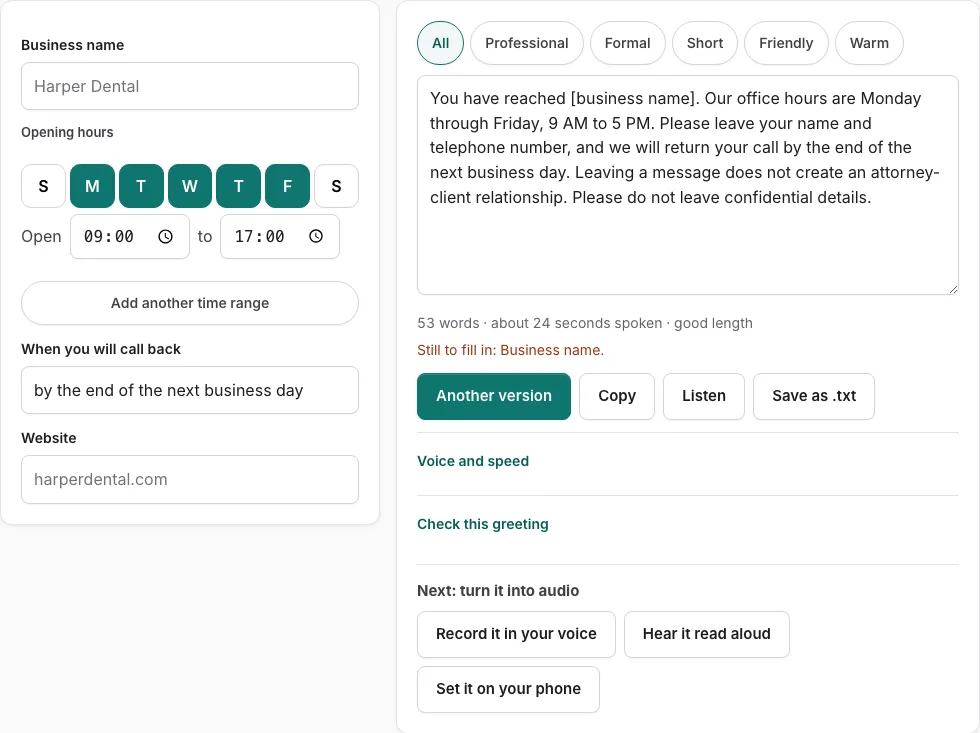
A voicemail greeting for a law firm commonly states that leaving a message does not create an attorney-client relationship, and each of the ten versions here includes that wording. Enter your firm name, hours, callback window and website in the fields on the left, and the full script appears on the right, ready to copy, save or record.
The page offers 10 versions. Tone buttons filter them to match your firm’s style, and “Another version” shows a different template of the same type without repeating the current one. You can also edit the script by hand. Once you edit it, field changes apply only when you press “Rebuild from the fields”.
A line under the text shows the word count and an estimated speaking time in seconds. “Check this greeting” scores your text on who answered, when the caller will hear back, and whether the length falls between 6 and 30 seconds.
How to use the Law Firm Voicemail Greeting Generator
- Enter your firm name in the firm name field.
- Fill in the hours, callback and website fields. Any field still empty shows as a bracketed placeholder, such as [business name], and a line lists what is still to fill in.
- Read the complete script on the right. Click a tone button to filter the versions.
- Click “Another version” to see a different template of the same type.
- Edit the text box by hand if you want changes. Once you edit it, changes in the fields are not applied until you press “Rebuild from the fields”.
- Check the word count and estimated speaking time under the text.
- Click “Listen” to hear the script read aloud with the speech voices on your device. Phone numbers are read digit by digit.
- Click “Check this greeting” to score the text against the five points.
- Click “Copy”, “Save as .txt”, or “Record it in your voice” to finish.
Tone buttons and “Another version” are the quickest shortcuts, since you can cycle through options without retyping your fields. “Listen” is the closest thing to a test run, but it reads the text aloud and does not create an audio file.
What should a law firm voicemail say?
A law firm voicemail should name the firm, explain that you cannot take the call right now, tell callers what to do next, and say when they can expect a reply. Add your hours and a website or other contact route so a caller with an urgent matter has another option. Keep the whole message short.
Write the greeting in this order:
- Name the firm and confirm the caller has reached the right number.
- Give a short reason you cannot answer, such as being with a client or in court.
- Give your hours so callers know when staff are available.
- Give a callback window you can keep.
- Name an alternative contact, such as a website, email address, or emergency number, if your firm has one.
- If your state bar has rules on advertising or prospective-client communications, check whether they call for any wording.
The tool builds this script from four fields: firm name, hours, callback, and website. Fill them in on the left and the full script appears on the right. An empty field shows as a bracketed placeholder such as [business name], and a line lists what is still to fill in.
Once you edit the script by hand, changes in the fields are not applied until you press ‘Rebuild from the fields’.
The disclaimer is a common pattern, not legal advice. Your state bar’s rules on advertising and confidentiality decide what you must say.
How does Check this greeting score a greeting?
“Check this greeting” scores your text against five points: who answered, why you did not pick up, what to do next, when the caller will hear back, and length between 6 and 30 seconds. For business types, it also checks opening hours.
| Check point | What your greeting needs |
|---|---|
| Who answered | Your firm name or your own name |
| Why you did not pick up | A short, plain reason |
| What to do | A next step: leave a message, call back, or use another contact |
| When they will hear back | A callback window |
| Length | Between 6 and 30 seconds |
| Opening hours (business types) | Your hours |
Frequently asked questions
How long should a law firm voicemail be?
Aim for the 6 to 30 second range that the length check accepts, and watch the estimated speaking time under the text. An attorney voicemail greeting follows the same rule, so a short script with the key points usually fits well inside that range.
How often should voicemail greetings be updated?
Update the greeting whenever your availability changes, such as for holidays, vacations, or new working hours. Change the hours or callback fields, then press “Rebuild from the fields” if you had edited the text by hand, and copy the new script.
How do I strike the right tone in my voicemail?
Click a tone button to filter the 10 versions, then use “Another version” if a template feels stiff or too casual. Click “Listen” to hear the script read aloud, and edit any line that does not sound like your practice.
Does a law firm voicemail need a disclaimer?
The disclaimer wording on this page is a common pattern, not legal advice, and your state bar’s rules on advertising and confidentiality decide what you must say. All 10 versions on this page state that leaving a message does not create an attorney-client relationship and ask callers not to leave confidential details.
Can I edit the greeting after it is generated?
Yes. The script is a text box, so you can change any words by hand. Once you edit it, changes in the fields are not applied until you press “Rebuild from the fields”, so rebuild after any field changes you want to keep.
Can I hear the greeting before I record it?
Click “Listen” to have the script read aloud with the speech voices already installed on your device. Listen does not create an audio file, so when you want a recording of your own voice, use “Record it in your voice” to open the recorder with the script on screen.
Related tools
- Business Voicemail Greeting Generator: Use it for business greetings with spoken hours.
- Professional Voicemail Greeting Generator: Use it for professional greetings with a checklist.
- After-Hours Voicemail Greeting Generator: Use it for after-hours greetings with spoken hours.
- Voicemail Greeting for Insurance Agent: Use it for greetings with a claims line.
- Voicemail Greeting for Small Business: Use it for for owner-run shops and studios.
- Voicemail Greeting for Medical Office: Use it for medical greetings with an emergency line.
- Voicemail Greeting Generator: Use it for greeting scripts for 17 situations.
- Voicemail Greetings by Industry: Use it to browse medical, dental, law, real estate, trades.