
How to Set Voicemail Greeting on Nextiva
Write your script, generate a studio-grade WAV file, and follow verified NextOS steps to update your business voicemail greeting.
Free · runs in your browser · nothing is uploaded
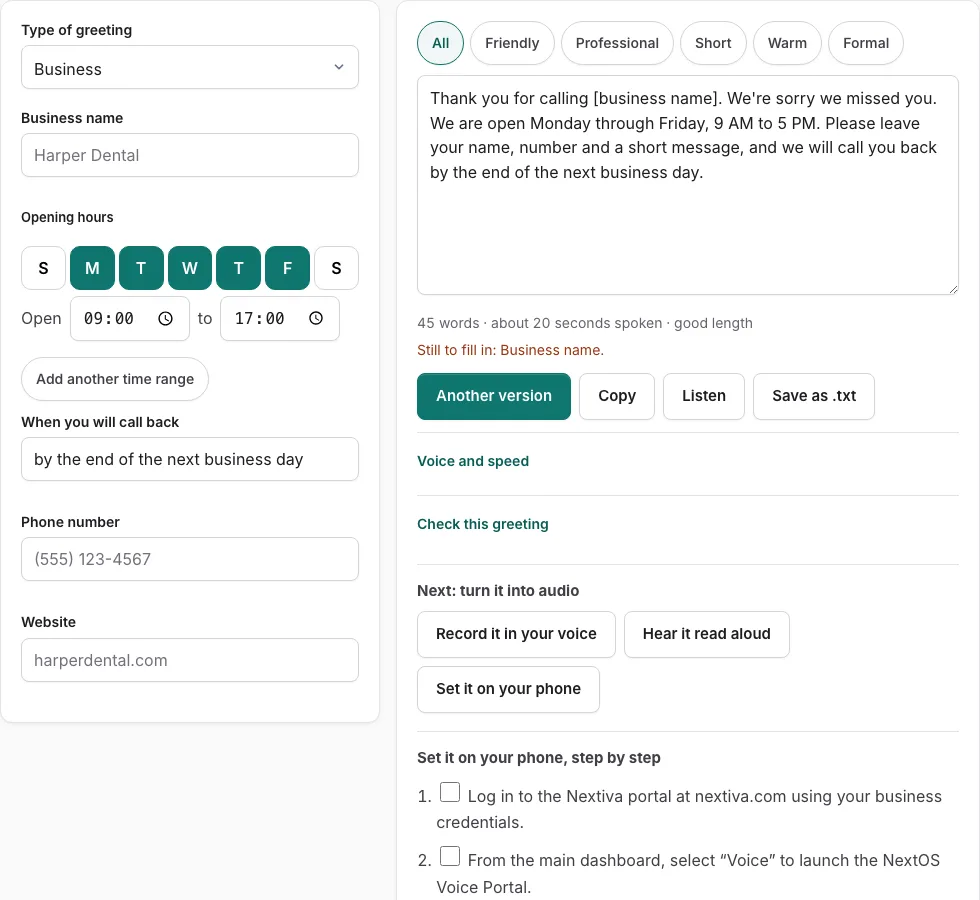
Steps to set your Nextiva voicemail greeting
Follow these verified steps to upload a studio-quality audio greeting or record directly into your Nextiva extension.
Before you start
- Obtain your NextOS portal credentials or request extension voicemail privileges from your office administrator.
- If uploading an audio file, export it in 8 kHz or 16 kHz Mono WAV format (our built-in converter formats this automatically).
Option 1: Uploading a WAV file in the NextOS Voice Portal
- Log in to the Nextiva portal at nextiva.com using your business credentials.
- From the main dashboard, select “Voice” to launch the NextOS Voice Portal.
- In the navigation sidebar, click “Users” and select your user profile or extension.
- Click on the “Features” tab, then locate and expand the “Voicemail” section.
- Under “Voicemail Greetings”, locate “No Answer Greeting” or “Busy Greeting”.
- Select “Custom” and click “Upload Audio”.
- Choose your exported WAV file from your computer (maximum file size 5 MB).
- Click “Save” at the bottom of the window to deploy your new greeting.
Option 2: Recording via telephone (*86)
- Pick up your Nextiva desk phone or launch the Nextiva desktop softphone.
- Dial *86 and press Send or Call.
- Enter your voicemail PIN followed by the # key.
- Press 3 to enter the Greetings menu.
- Press 1 to record a new No Answer greeting.
- Speak your script clearly after the tone, and press # when finished.
- Press 1 to accept and activate the greeting, or press 2 to re-record.
NextOS audio format requirements and upload rules
Nextiva Voice operates over high-reliability SIP trunks that standardise audio on G.711 telecommunication standards. When uploading custom recordings to the NextOS Audio Library, adhering to the platform’s audio encoding rules prevents distorted audio and upload rejection errors.
Standard consumer audio files downloaded from video platforms or smartphone voice memo apps are typically encoded in stereo 44.1 kHz or 48 kHz AAC/MP3. Nextiva requires standard uncompressed PCM or mu-law telephone audio.
| Audio Parameter | Nextiva Requirement | Common Mismatch Error |
|---|---|---|
| File Format | WAV (RIFF header) | “Unsupported file format” |
| Audio Channels | Mono (1 channel) | “Multi-channel audio not supported” |
| Sampling Rate | 8,000 Hz or 16,000 Hz | Playback pitch too fast/slow |
| Bit Depth | 16-bit PCM or 8-bit G.711 u-law | Audio clipping or silence |
| File Size Limit | 5 MB maximum | “File exceeds size quota” |
Distinguishing Busy versus No Answer greetings in Nextiva
Nextiva allows users to configure distinct greetings for different call conditions:
- No Answer Greeting: Plays when an incoming call rings your phone for the preconfigured number of rings (typically 3 to 4 rings) without being picked up. This greeting should thank the caller, state your normal availability, and invite them to leave their name, phone number, and reason for calling.
- Busy Greeting: Plays when you are already engaged on an active call and do not have call waiting enabled, or when your extension is manually toggled to “Do Not Disturb”. This greeting should acknowledge that you are assisting another client and offer emergency contact options or web alternatives.
- Alternative Greetings: Temporary greetings designed for vacations and out-of-office conferences that override normal schedules without deleting your primary recording. Administrators can schedule these greetings to expire automatically on a specified date.
Recommended telecommunication bitrates
Nextiva systems achieve maximum voice clarity when audio files are exported with an exact 8,000 Hz sample rate, 16-bit linear PCM resolution, and a single mono channel. Using multi-channel stereo files or 48 kHz recordings forces lossy server-side transcoding that introduces background hiss or muffled vowels.
Auditing Nextiva voicemail storage limits
Each NextOS user mailbox stores up to 100 messages or a maximum total duration of 300 minutes. Setting an automated email forwarding rule with audio attachments ensures that team members never miss high-value client voicemails even when mailbox quotas fill during extended vacations.
Frequently asked questions
Why does Nextiva reject my MP3 or WAV file during upload?
Nextiva strictly enforces mono channel configuration and telephone sampling rates. If your WAV file was saved in stereo or 44.1 kHz, use the WAV converter on this site to convert it to 8 kHz 16-bit Mono WAV before uploading.
How do I access Nextiva voicemail from an outside line?
Dial your main business phone number. When your greeting begins playing, press the * key, enter your extension number if prompted, followed by your voicemail PIN and the # key to access mailbox controls.
Can Nextiva administrators upload greetings for other users?
Yes. Account administrators can open the NextOS Admin Portal, navigate to Users > select the target user > Features > Voicemail, and upload custom audio files on behalf of any team member.
How many rings before Nextiva sends a caller to voicemail?
NextOS defaults to 3 rings (approximately 15 seconds) before transferring. Administrators can adjust this threshold between 2 and 20 rings under Call Forwarding settings.
Can I set different Nextiva greetings for after hours?
Yes. In NextOS Schedule settings, administrators can establish office operating hours and assign separate business hour and after-hours greetings across company extensions.
How long does Nextiva take to update a newly uploaded greeting?
Audio updates uploaded through the NextOS Voice Portal take effect immediately across all desktop softphones, IP desk phones, and mobile apps connected to your extension.
Related tools
- How to Set Voicemail Greeting on RingCentral: Cloud PBX steps
- How to Set Voicemail Greeting on Zoom Phone: Audio library
- Voicemail Greeting WAV Converter: 8 kHz telephone audio
- Business Voicemail Greeting Generator: Commercial scripts
- After Hours Voicemail Greeting: Opening hours schedule
- Holiday Voicemail Greeting: Reopening date calculator