
How to Change Voicemail Greeting on T-Mobile
Write your greeting here first, then follow T-Mobile official steps to record it on your phone.
Free · runs in your browser · nothing is uploaded
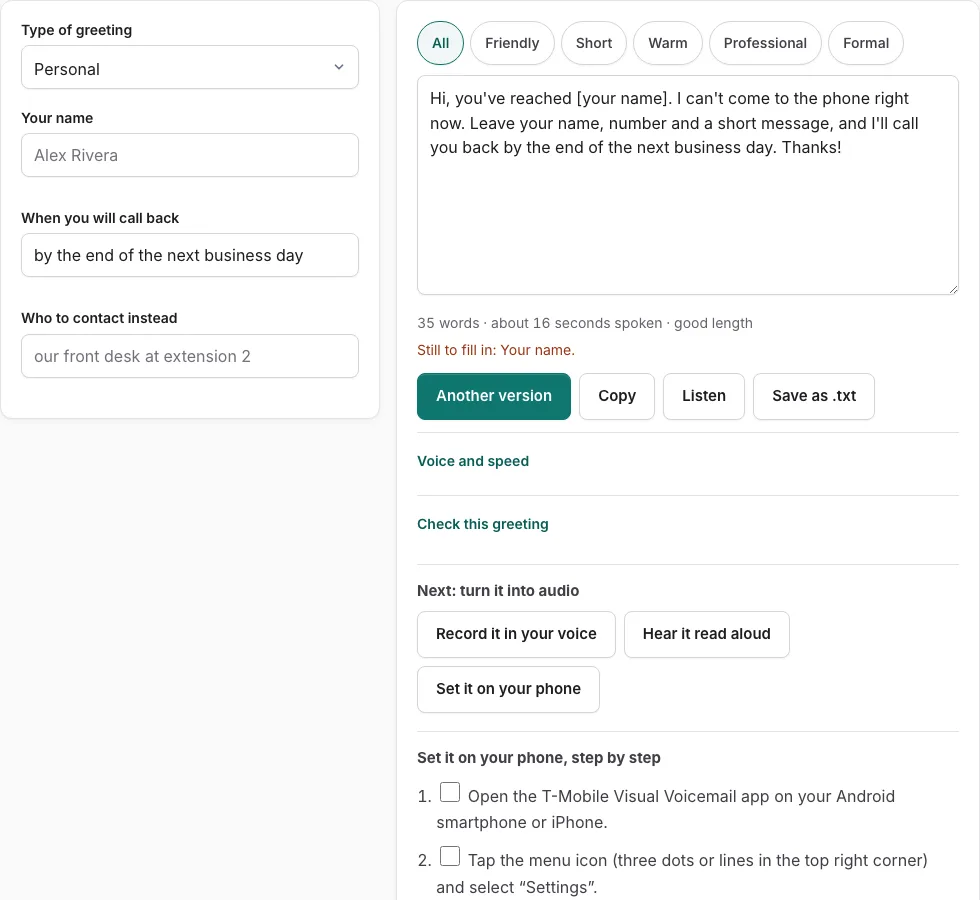
Steps to change your T-Mobile voicemail greeting
Prepare your script above first, then follow these verified steps on your T-Mobile mobile phone.
Before you start
- Confirm your T-Mobile cellular line is connected and your voicemail PIN is established.
- Choose a quiet space to eliminate traffic noise and room reverberation.
Option 1: Using the T-Mobile Visual Voicemail app
- Open the T-Mobile Visual Voicemail app on your Android or iPhone device.
- Tap the menu icon in the top right corner and select “Settings”.
- Tap “Greetings & PIN” or “Voicemail Greetings”.
- Select “Custom” to replace the automated carrier announcement.
- Tap Record, hold your phone four inches away, and speak your prepared script.
- Tap Stop when finished, then tap Play to review the recording.
- Tap “Save” to publish the greeting to your mobile line immediately.
Option 2: Dialing the carrier shortcut (123)
- Open the Phone dialer and dial 123, or press and hold the 1 key.
- Enter your voicemail PIN followed by the # key when prompted.
- If messages begin playing automatically, press * to reach the Main Menu.
- Press 3 for Mailbox Options, then press 1 to change your greeting.
- Press 2 to record a custom personal greeting, speak after the tone, and press #.
- Press 1 to activate the greeting, or press 2 to review and re-record.
Understanding T-Mobile voicemail greeting options
T-Mobile provides three distinct mailbox greeting formats for mobile subscribers: standard system greetings announcing your ten-digit telephone number, standard greetings playing your recorded name, and full custom personal greetings. Custom greetings consistently deliver the highest caller confidence because incoming contacts know immediately that they have reached the correct individual or enterprise.
When callers hear a generic robotic operator reciting numbers, hang-up rates increase significantly. Recording a clear personal message stating your name, business affiliation, and typical callback window reassures callers that their voice messages will receive attention.
Visual Voicemail app versus keypad dialing comparison
The Visual Voicemail application provides visual controls, on-screen audio scrubbers, and immediate status feedback. In contrast, dialing 123 works over standard cellular voice channels on any hardware model, including basic feature flip phones, without requiring an active mobile data plan.
| Feature Comparison | Visual Voicemail App | Dialing 123 Keypad |
|---|---|---|
| Device compatibility | iOS & Android smartphones | All mobile phones & flip phones |
| Data requirement | Cellular data or Wi-Fi | Cellular voice signal only |
| Audio preview | Visual waveform scrubber | Keypad audio playback prompt |
| Maximum length | 180 seconds | 180 seconds |
| Recommended target | 18 to 25 seconds | 18 to 25 seconds |
How to optimize your T-Mobile recording quality
Cellular telephone networks encode voice signals using compressed AMR and EVS audio codecs designed for conversational speech. To maximize speech clarity and prevent distortion when recording through your handset:
- Maintain a consistent four to six inch distance from your mouth to avoid breath plosives on P, B, and T consonants.
- Speak slightly slower than everyday conversation; an even pace of 125 to 135 words per minute ensures optimal intelligibility across competing carrier networks.
- Announce your name or business identity within the first three seconds so callers know immediately who they have reached.
- Conclude with an explicit request asking the caller to state their name, callback number, and inquiry details clearly so you can respond promptly.
Carrier network synchronization
When saving a greeting via the Visual Voicemail app or 123 dial-in, your phone transmits audio to T-Mobile’s regional voicemail application servers. This synchronization typically takes under thirty seconds across modern 5G and LTE networks.
Troubleshooting T-Mobile greeting update delays
If callers still report hearing your previous greeting after saving changes in the Visual Voicemail app, restart your mobile device to clear local carrier cellular cache. Alternatively, dial 123 from your keypad and confirm that personal greeting option 1 is marked active.
Frequently asked questions
Why does my T-Mobile voicemail greeting sound muffled or distorted?
Microphones on mobile handsets compress close-range air bursts. Hold your phone four to six inches from your mouth rather than resting it against your cheek while recording, and record in an interior room away from fans or air conditioners.
What is the default T-Mobile voicemail PIN code?
T-Mobile has no universal default PIN. New accounts must dial 123 upon activation and follow the voice prompts to establish a personal 4 to 7 digit security code before custom greetings can be saved.
Can consumer T-Mobile accounts upload pre-recorded WAV audio files?
Standard consumer lines only support recording via the Visual Voicemail app or 123 dial-in. T-Mobile for Business accounts using Account Hub can upload WAV files via their administrative portal.
How long can a T-Mobile voicemail greeting be?
T-Mobile supports greetings up to three minutes (180 seconds). Best business practice is keeping messages under 25 seconds so callers do not hang up before leaving a message.
How do I access T-Mobile voicemail from another phone?
Dial your ten-digit mobile number from any phone. When your voicemail greeting begins playing, press the * key, enter your voicemail PIN followed by #, and listen to your messages.
How do I know if my T-Mobile greeting saved successfully?
Call your own mobile number from a separate phone or landline to test playback. Your new greeting should begin playing immediately after three or four rings.
Related tools
- How to Change Voicemail Greeting on iPhone: Official steps
- How to Change Voicemail Greeting on Android: Visual voicemail
- How to Change Voicemail Greeting on Verizon: Carrier steps
- How to Change Voicemail Greeting on AT&T: Phone setup
- Business Voicemail Greeting Generator: Professional scripts
- Record Voicemail Greeting Online: Export phone-ready WAV