
Holiday Voicemail Greeting Generator
Choose the holiday and your opening days and get a greeting that says when you reopen.
Free · runs in your browser · nothing is uploaded
How to use the Holiday Voicemail Greeting Generator
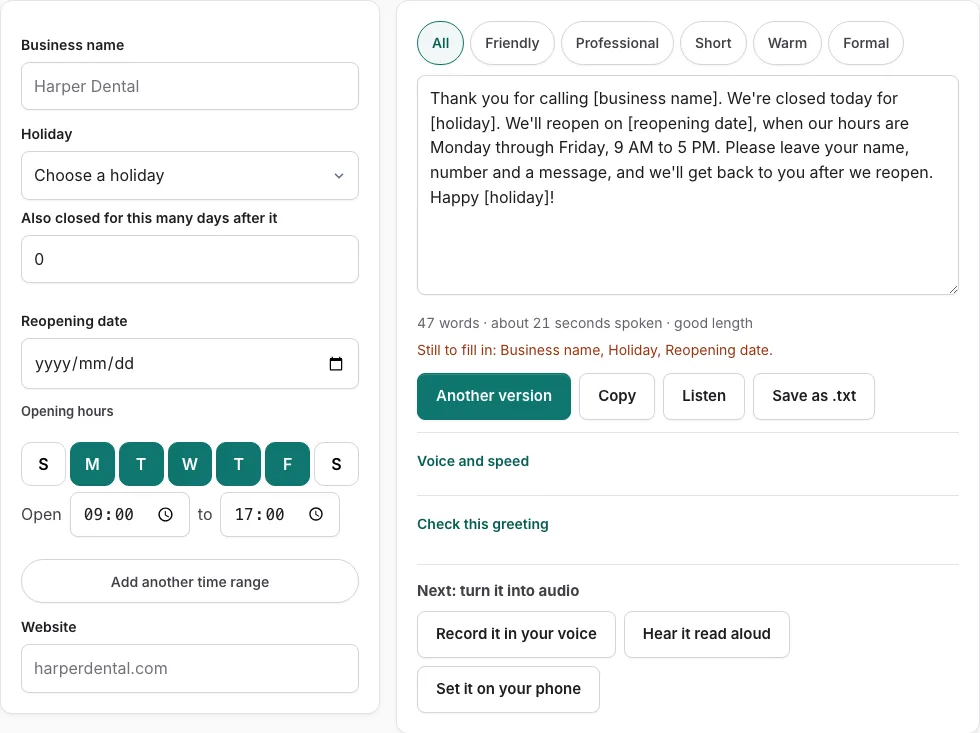
- Choose a holiday from the menu, which lists the next 16 holiday entries.
- Type your business name.
- Enter your opening hours so the reopening date skips your closed days and any federal holiday.
- Check the reopening date. Use “Also closed for this many days after it” if you stay shut longer, or type a date over the suggested one.
- Add your website if callers should see it.
- Read the script on the right. Press a tone button to filter versions, or “Another version” for a different template of the same type.
- To edit by hand, change the text directly. Field changes will not reach your edited text until you press “Rebuild from the fields.”
- Check the line under the text for the word count and estimated speaking time in seconds.
- Press “Check this greeting” to score the script on five points and, for business types, your opening hours.
- Press “Listen” to hear the script read aloud, “Copy” to copy the text, “Save as .txt” to download it, or “Record it in your voice” to open the recorder with the script on screen.
A field still empty shows as a bracketed placeholder such as [business name], and a line under the fields lists what is still to fill in. If the first script does not suit you, try another tone or version before editing by hand.
When should I put on a holiday voicemail greeting?
Put the greeting on before your closure starts, and take it off once you reopen. The reopening date the tool calculates is the next day you are open, so it shows you the day to switch back.
- List every day you will be closed, including any extra days after the holiday.
- Set the holiday and the “Also closed for this many days after it” value so the reopening date matches that list.
- Copy the script and load it onto your phone system before the first closed day.
- Switch back to your normal greeting on the reopening day.
How does the holiday menu pick each date?
The holiday menu lists the next 16 holiday entries and sets each date by the rule that fits it. Federal holidays that fall on a weekend move to a weekday, and Easter and Good Friday are calculated for you. The table shows each group.
| Holiday | How the date is set |
|---|---|
| New Year’s Day, Juneteenth, Independence Day, Veterans Day, Christmas Day | Fixed date. A Saturday holiday is observed on Friday, and a Sunday holiday on Monday. Independence Day 2026 falls on Saturday July 4th and is observed Friday July 3rd. |
| Martin Luther King Jr. Day, Presidents’ Day, Memorial Day, Labor Day, Columbus Day (the same Monday is also listed as Indigenous Peoples’ Day) | Set by week and weekday. Labor Day, for example, is the first Monday in September. |
| Thanksgiving and the day after Thanksgiving | Thanksgiving is the fourth Thursday in November. The day after is the Friday that follows. |
| Good Friday and Easter | Calculated by the tool from the date of Easter. |
| Christmas Eve and New Year’s Eve | Listed on the menu as set dates. Check them against your own schedule. |
The reopening day also skips federal holidays: Christmas Eve 2026 is a Thursday, so the tool suggests Monday, December 28th because Friday the 25th is a federal holiday. A short greeting such as “Happy Thanksgiving!” or “Merry Christmas!” is added only on days where one fits; scripts for Memorial Day, Good Friday, Veterans Day or the day after Thanksgiving have none. Federal holidays are the common reference point, but your business may observe different days. The dates apply to the United States only.
Frequently asked questions
Why use a holiday voicemail greeting?
A holiday greeting tells callers why nobody is picking up, when you will be back, and what they can do in the meantime. It also shows that you have not forgotten them while you are closed.
Business voicemail greeting for holidays
Pick the holiday, type your business name, enter your opening hours, and check the reopening date. Because the reopening date skips your closed days and federal holidays, the script gives callers the first day you are open again.
Christmas voicemail greeting
Choose Christmas Day or Christmas Eve from the holiday menu. If Christmas Day falls on a weekend, the menu uses the observed weekday under the federal rule, so check the date shown before you copy the script.
Out of office voicemail message examples for holidays
The 10 versions on this page give you different wording for the same holiday. Press “Another version” to see a new template without repeating the one on screen, then keep the one that sounds most like your business.
What should I say in my holiday greeting?
Cover who answered, why you did not pick up, what callers should do, and when they will hear back. “Check this greeting” scores your text on those points, plus a length of 6 to 30 seconds, and for business types it also checks your opening hours.
What are some voicemail greeting styles?
Use the tone buttons to filter the 10 versions on the page. Within a tone, “Another version” shows a different template of the same type, so you can compare several before you choose one.
Related tools
- Out of Office Voicemail Greeting Generator: Use it for out of office greetings with return date.
- After-Hours Voicemail Greeting Generator: Use it for after-hours greetings with spoken hours.
- Business Voicemail Greeting Generator: Use it for business greetings with spoken hours.
- Voicemail Greeting for Small Business: Use it for for owner-run shops and studios.
- Voicemail Greeting Generator: Use it for greeting scripts for 17 situations.
- Personal Voicemail Greeting Generator: Use it for personal greetings for a cell phone.
- How to Record a Voicemail Greeting Online: Use it for record and download a phone-ready WAV.
- Voicemail Greetings: Use it to browse business, personal, holiday, funny and more.