
Funny Voicemail Greeting Generator
Choose playful, dry or absurd, add your name and record the one that makes you laugh.
Free · runs in your browser · nothing is uploaded
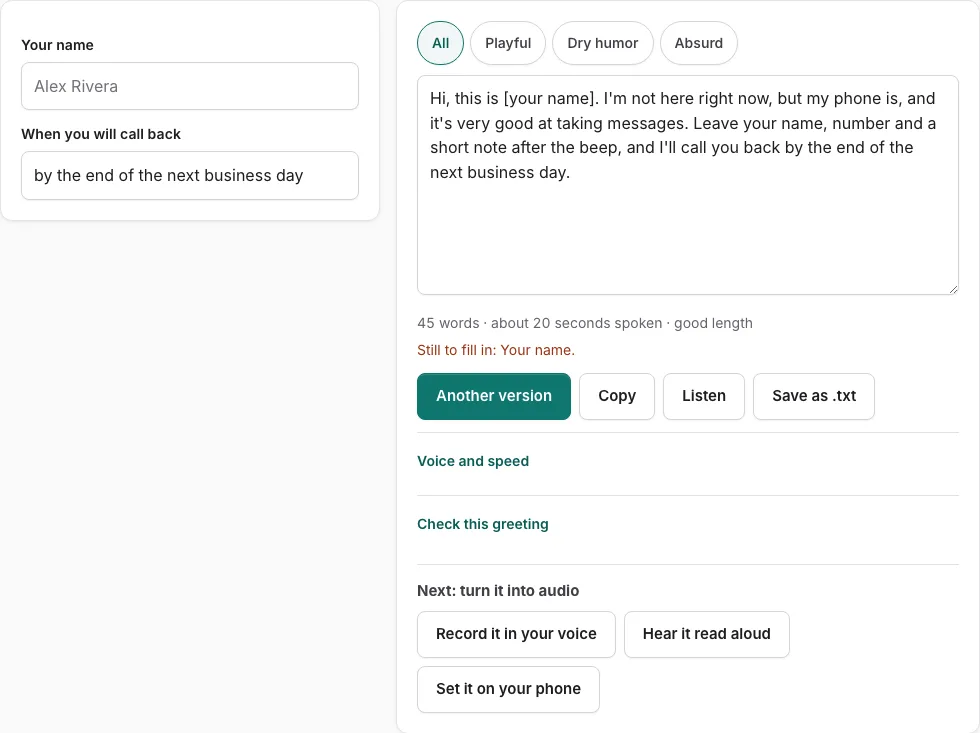
How to use the Funny Voicemail Greetings tool
- Choose a tone with the buttons: Playful, Dry humor or Absurd.
- Fill in the fields on the left, such as your name, your number and the message you want left.
- Read the script on the right. Any empty field shows as a bracketed placeholder such as [business name], and a line lists what is still to fill in.
- Check the word count and estimated speaking time under the text. Keep a funny greeting under 15 seconds, since humour works best short.
- Press Another version to see a different template of the same type, without repeating the current one.
- Edit the script by hand in the text box if you want different wording. Once you edit it, changes in the fields are not applied until you press Rebuild from the fields.
- Press Listen to hear the script read aloud with the voices on your device. Phone numbers are read digit by digit. It does not produce an audio file.
- Press Check this greeting to score the text against five points, including a 6-30 second length. Business types also get an opening hours check.
- Press Copy, Save as .txt, or Record it in your voice to open the recorder with the script on screen.
Try each tone with Another version before you settle on one script.
How do I make a funny voicemail greeting that still works?
A funny greeting works when the joke is short and the practical details still reach the caller. Keep the humour brief, then make sure the caller knows who they reached and what to do next, so no one hangs up laughing and wondering what to say.
- Choose a tone: Playful, Dry humor or Absurd. The tone buttons filter the versions, so try each one.
- Fill in your name, your number and the message you want left. Every funny script asks for these three. An empty field shows as a bracketed placeholder such as [business name], and a line lists what is still to fill in.
- Read the script and confirm the instructions come after the joke, not instead of it.
- Check the word count and speaking time line, and keep the greeting under 15 seconds.
- Press Check this greeting. It scores who answered, why you did not pick up, what to do, when they will hear back, and length.
- Press Another version if the joke falls flat. It shows a different template of the same type without repeating the current one.
- Edit the wording by hand if needed. Once you do, changes in the fields are not applied until you press ‘Rebuild from the fields’.
- Press Listen to hear the script read aloud, then record it in your own voice once it sounds right.
How long should a voicemail greeting be?
A funny greeting should stay under 15 seconds, because humour works best when it is short. The check scores length against a 6 to 30 second range, and the estimate under the text shows the speaking time in seconds.
| Measure | Value | What it means for you |
|---|---|---|
| Funny greeting target | Under 15 seconds | Keeps the joke from running long |
| Length range the check scores | 6 to 30 seconds | Sets the range for a complete greeting |
| Speaking rate used for the estimate | 2.4 words per second | Adds 0.35 s after each sentence and 0.45 s per spoken digit |
The timing is an estimate, not a measurement, so record the greeting once and listen back to confirm it.
Frequently asked questions
What’s a good funny voicemail greeting?
Start with one of the 18 funny scripts, in Playful, Dry humor or Absurd. Each one asks for your name, your number and your message, so the caller knows who they reached and how to respond.
Can I download funny voicemail greetings audio?
The tool does not create an audio file. Listen reads the script aloud with voices already on your device, and Save as .txt downloads the text itself. To keep a spoken version, use Record it in your voice.
Are the funny voicemail greetings from movies?
No. The scripts are original wording written for this site. The page does not offer movie-quote clips or downloads of other people’s recordings, and reading someone else’s film lines aloud is a copyright question this page does not settle.
What should you say on your voicemail?
Tell the caller who they reached, why you did not pick up, what they should do, and when they will hear back from you. The Check this greeting button scores your script on these points and adds opening hours for business types.
How do I personalize my voicemail greeting?
Fill in the fields on the left with your own details. Empty fields stay as bracketed placeholders, and the line under the text lists anything still missing.
Can I edit the script after I fill in the fields?
Yes, the script is a text box you can change by hand. After you edit it, changes in the fields are not applied until you press Rebuild from the fields.
Related tools
- Personal Voicemail Greeting Generator: Use it for personal greetings for a cell phone.
- Voicemail Greeting Ideas: Use it for opening lines for eight occasions.
- How to Record a Voicemail Greeting Online: Use it for record and download a phone-ready WAV.
- Voicemail Greeting Examples: Use it for 177 examples you can personalise.
- Voicemail Greeting Generator: Use it for greeting scripts for 17 situations.
- Business Voicemail Greeting Generator: Use it for business greetings with spoken hours.
- Voicemail Greetings: Use it to browse business, personal, holiday, funny and more.