
Voicemail Greeting for Dental Office
Add your hours and your dental emergency number and get a greeting for the front desk line.
Free · runs in your browser · nothing is uploaded
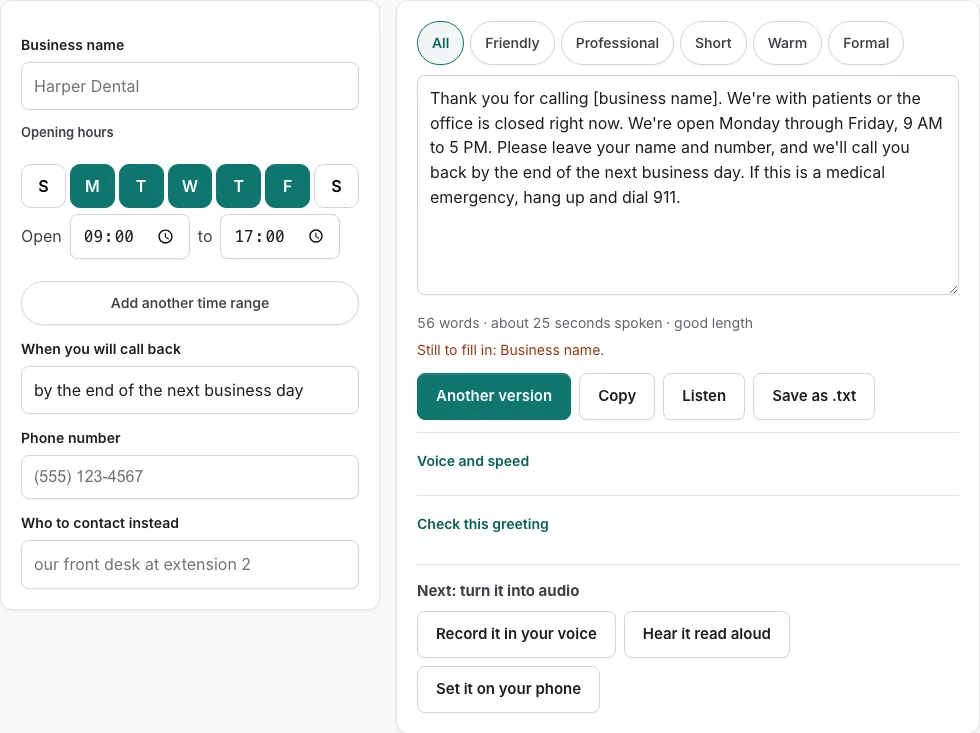
How to use the dental office voicemail greeting generator
- Pick a tone with the tone buttons. They filter the nine dental versions.
- Fill in the office name, hours, callback, phone and after-hours or emergency line fields. An empty field shows as a bracketed placeholder such as [business name], and a line under the fields lists what is still missing.
- Read the script on the right. If the line still lists items, fill them in before you use the greeting.
- Press Another version to see a different template of the same type. It will not repeat the one you are looking at.
- Edit the text box by hand if you want different wording. Once you edit it, changes in the fields are not applied until you press Rebuild from the fields.
- Look at the word count and estimated speaking time under the text.
- Press Check this greeting to score the text against the five points and, for business types, opening hours.
- Press Listen to hear the script read aloud with the voices already on your device. Phone numbers are read digit by digit.
- Press Copy, Save as .txt, or Record it in your voice when the script is ready.
Tone buttons and Another version are the quickest way to compare options. Listen is useful for catching awkward phrasing, but it does not produce an audio file. Save as .txt gives you a copy you can keep with your phone system notes.
What should a dental office voicemail greeting say?
A good dental office greeting names the practice, explains that the team cannot take the call right now, tells the caller what to do next, and says when they will hear back. The generator builds these parts from the fields you fill in. In most scripts, the order is:
- Your office name, so callers know they reached the right number.
- A short reason, such as the team being with patients or the office being closed.
- Your hours, or your after-hours line, when the field is filled in.
- A request for the caller’s name, number and reason for calling.
- When they will hear back, such as the next business day.
How long should a dental office voicemail be?
Keep the greeting short enough that callers stay on the line. The tool’s length check accepts greetings from 6 to 30 seconds. The speaking time estimate uses these values:
| Setting | Value used by the tool |
|---|---|
| Speaking rate | 2.4 words per second |
| Pause after each sentence | 0.35 seconds |
| Each spoken digit | 0.45 seconds |
| Length check range | 6 to 30 seconds |
The estimate is calculated, not measured. A phone number adds more time than the same number of words, because each digit adds 0.45 seconds.
Should a dental office voicemail mention emergencies?
Yes, but keep a dental emergency apart from 911. The nine dental scripts give dental emergencies their own number and keep it separate from the 911 medical emergency line. They also ask whether the caller wants to schedule an appointment. 911 is for life-threatening medical emergencies, so the dental sentence should point to your own emergency number. If you leave the emergency-line field empty, the dental-emergency sentence is dropped and the 911 medical sentence stays in the script, so fill that field in if your office has one.
What happens when you edit the script by hand?
The script is a text box you can edit by hand. Once you edit it, field changes are not applied until you press ‘Rebuild from the fields’.
Frequently asked questions
What makes a great dental office voicemail greeting?
The check scores a greeting on five points: who answered, why the call was missed, what the caller should do, when they will hear back, and whether it runs between 6 and 30 seconds. For business types it also checks opening hours. A greeting that covers all five gives the caller a clear next step.
What should I consider when writing a dentist voicemail script?
Fill every field first, because a bracketed placeholder will stay in the text if you leave it. If you edit the script by hand, press Rebuild from the fields before changing any field values, or your edits and field changes will not match. Check the length and listen to the script before you use it.
Can I get an audio version of my voicemail greeting?
This tool does not create an audio file. Listen reads the script aloud with your device’s voices, and Record it in your voice opens the recorder with the script on screen so you can read it yourself.
What are some examples of dental office voicemails my practice could use?
The page includes nine dental versions. The tone buttons narrow them to the style you want, and Another version shows a different template of the same type. Each example is built from your own office name, hours and phone numbers.
How long should a dental office voicemail be?
The check accepts greetings from 6 to 30 seconds, and the speaking time under the text is an estimate based on 2.4 words per second. Use the word count and time shown under the script to see where your greeting falls in that range.
Related tools
- Voicemail Greeting for Medical Office: Use it for medical greetings with an emergency line.
- After-Hours Voicemail Greeting Generator: Use it for after-hours greetings with spoken hours.
- Business Voicemail Greeting Generator: Use it for business greetings with spoken hours.
- Voicemail Greeting for Small Business: Use it for for owner-run shops and studios.
- Voicemail Greeting for Therapist: Use it for greetings with 988 crisis wording.
- Voicemail Greeting for Real Estate Agent: Use it for greetings that ask for the property.
- Voicemail Greeting Generator: Use it for greeting scripts for 17 situations.
- Voicemail Greetings by Industry: Use it to browse medical, dental, law, real estate, trades.