
Customer Callback Voicemail Script Generator
Create clear, polite customer service callback voicemail scripts for returning missed calls, appointment confirmations, and service follow-ups.
Free · runs in your browser · nothing is uploaded
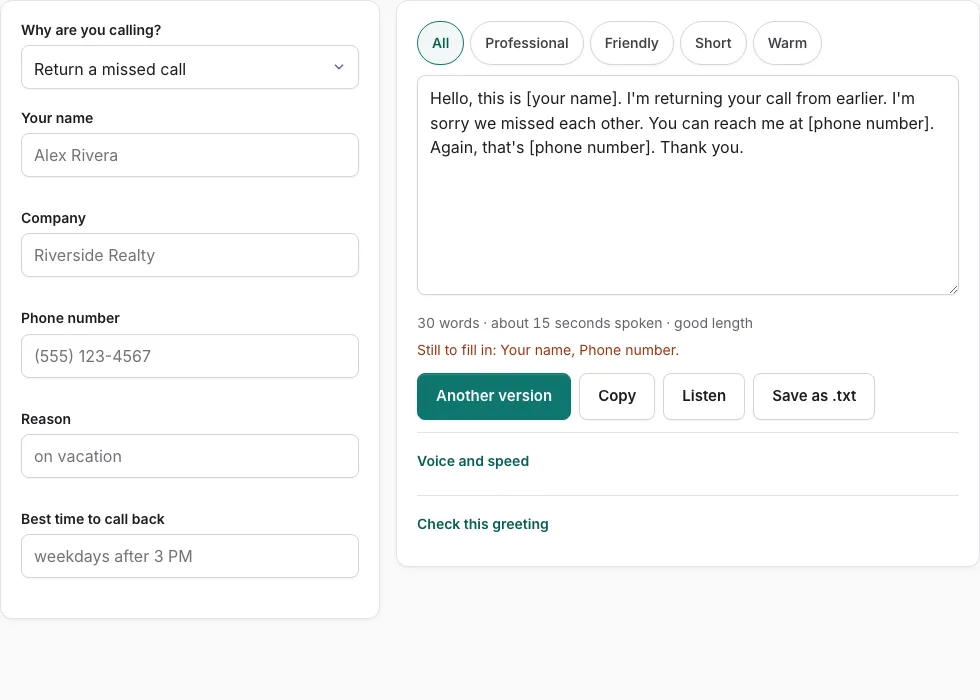
How to generate a customer callback voicemail script
Follow these simple steps to compose a clear, helpful callback message that eliminates phone tag and informs clients.
- Enter your name or agent identifier in the Name field above.
- Enter your organization or department name in the Company field.
- Provide your direct extension or department callback telephone number.
- Enter the topic or ticket reference in the Reason field (e.g., “your recent service ticket #4120”).
- Specify your availability window in the Time field so the customer knows when you are at your desk.
- Select a tone (Professional, Warm, Friendly, or Short) to explore script templates.
- Click “Listen” to review the message delivery and ensure speaking pace is clear.
- Verify that the estimated duration stays under 30 seconds so the customer receives a concise message.
- Click “Check this greeting” to ensure that callback hours and telephone numbers are prominent.
- Click “Copy” to paste the text into your call center software or phone dialer notepad.
- Speak the script calmly into the customer’s voicemail box, enunciating reference numbers clearly.
Enunciation and reference details
Speak case numbers, ticket IDs, and contact phone numbers clearly and slightly slower than your normal speech. Repeating your telephone number at the end ensures the customer can take notes easily.
Best practices for customer callback voicemail scripts
When leaving a voicemail for an existing customer or client, your message should be helpful, clear, and reassuring.
Unlike cold calls where you must generate curiosity, a customer callback should immediately confirm that their request is being handled actively:
- Acknowledge the Original Request Promptly: Mention that you are returning their earlier call, inquiry, or online service ticket so the customer connects the message to their pending issue.
- State Any Immediate Resolution or Update: If their issue is resolved (such as a confirmed appointment, shipped replacement part, or processed refund), state that clearly so the customer does not need to call back unnecessarily.
- Reference Account or Ticket Identifiers: Providing a ticket number or case ID allows the customer to look up details or reference them quickly if another representative answers when they call back.
- Provide Clear Return Contact Details: Give your direct extension, department phone number, and hours of availability so the customer knows when you can be reached.
| Callback Scenario | Primary Goal | Recommended Script Content |
|---|---|---|
| Missed Inbound Call | Acknowledge call and offer return help | “I’m returning your call regarding [Topic]. I’m available until 5 PM at [Phone].” |
| Appointment Confirmation | Verify date and preparation requirements | “Calling to confirm your appointment for [Date]. Please call back to confirm or reschedule.” |
| Order / Repair Update | Deliver status without forcing callback | “Your repair order is complete and ready for pickup at our main office.” |
| Billing / Account Inquiry | Request specific document or callback | “Regarding your recent invoice question, please give our billing team a call at [Phone].” |
Protecting customer privacy in voicemail messages
In many regulated industries (including healthcare, financial services, and legal advisory), leaving detailed private information on an answering machine violates confidentiality rules:
- Healthcare (HIPAA): Never disclose medical diagnoses, test results, or prescription details in a voicemail. State only your name, practice name, and a request to return the call.
- Financial & Debt Collection (FDCPA): Disclosing debt status or financial balances on shared family answering machines is strictly prohibited. Keep financial callbacks discreet and professional.
- Verify Recipient Number: Double-check that you have dialed the customer’s recorded primary contact number before leaving identifying information.
Logging callback attempts in CRM systems
Always log the exact timestamp and a brief summary of the voicemail message in your CRM or ticketing platform. This keeps your entire customer service team informed if the client calls back while you are away from your desk.
Escalating complex customer inquiries before calling back
If a client inquiry requires input from technical engineering or billing specialists, consult with internal team members before leaving a voicemail so your message can provide concrete status updates.
Frequently asked questions
What information should always be included in a customer callback voicemail?
State your name, company, the reason you are calling (referencing a ticket or order number), your callback telephone number repeated twice, and your available hours.
How long should a customer callback voicemail be?
Aim for 20 to 30 seconds. Customers appreciate concise updates that state clearly whether they need to take action or if their issue is already resolved.
Can I leave medical or financial details on a customer voicemail?
No. Regulated privacy laws such as HIPAA and FDCPA prohibit disclosing sensitive medical or debt information on voicemails. Request a secure callback instead.
What should I do if the customer issue is already resolved?
State the resolution in your voicemail (e.g., “Your refund has been processed”). This saves the customer time and reduces unnecessary inbound call volume.
What if the customer does not have a direct extension to return my call?
Provide your main support line and provide your ticket number so whichever agent answers can pull up the file instantly.
How many times should I attempt to call a customer before closing a ticket?
Standard service level agreements recommend making two to three callback attempts across different times of day over two business days before sending a final email notification.