
Voicemail Greeting for Contractor
Say you are on a job, ask for the address and the best time to call back.
Free · runs in your browser · nothing is uploaded
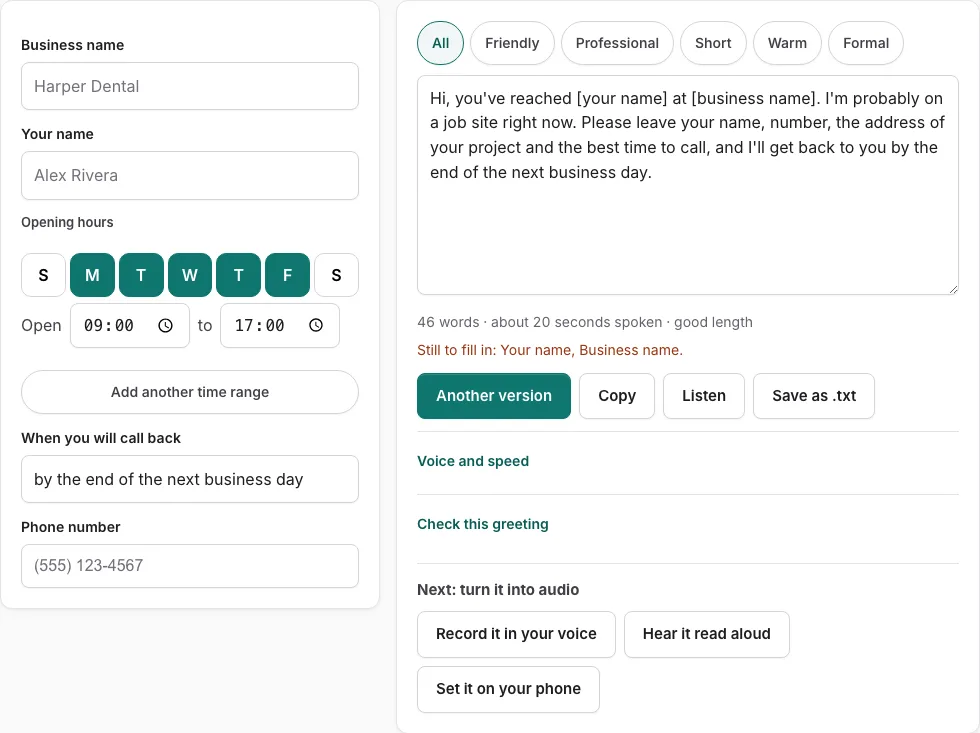
A voicemail greeting for a contractor can say you are on a job, ask for the project address and the best time to call, and promise a callback, which is the pattern of these ten scripts. Fill in the fields on the left and a complete script appears on the right, ready to copy, save as a .txt file, or record in your own voice. The script is written in the voice of someone on a job site and asks callers for the project address and a best call-back time.
There are 10 versions on the page. Tone buttons filter them, and ‘Another version’ shows a different template of the same type without repeating the one on screen. A line under the text gives the word count and an estimated speaking time in seconds, so you can keep the message short.
How to use the Contractor Voicemail Greeting Generator
- Press a tone button to narrow the versions to the style you want.
- Type your business name in the business name field, then your name in the your name field.
- Enter your opening hours in the hours field.
- Enter the time you will call back in the callback field.
- Enter your phone number in the phone field. When you listen to the script, the number is read digit by digit.
- Read the script on the right. Any empty field shows as a bracketed placeholder such as [business name], and a line lists what is still to fill in.
- Press ‘Another version’ if you want a different template of the same type.
- Edit the text box by hand if you need to. After a manual edit, field changes are not applied until you press ‘Rebuild from the fields’.
- Check the word count and speaking time line under the text.
- Press ‘Listen’ to hear the script read aloud, or use ‘Copy’, ‘Save as .txt’ or ‘Record it in your voice’.
Listen uses the speech voices already installed on your device and does not create an audio file. Use ‘Check this greeting’ before you save the final version.
What should a contractor’s voicemail say?
Your contractor voicemail should tell callers who they have reached, why you did not answer, what to do next, and when they will hear back. Include your opening hours so callers know whether to call again later, and keep the whole message short.
Cover these points, in order:
- The business name and your name, so the caller knows they have the right number.
- A short reason you missed the call, such as being on a job site.
- Your opening hours, so the caller knows when someone is available.
- What to do next: leave the project address, the job details and a best call-back time.
- Your phone number, and when they can expect a reply.
An empty field shows as a bracketed placeholder such as [business name], and a line lists what is still to fill in.
Tone buttons filter the 10 versions, and ‘Another version’ shows a different template of the same type. If you edit the script by hand, press ‘Rebuild from the fields’ before field changes take effect.
How do I check my contractor voicemail greeting?
Press ‘Check this greeting’ to score the text against five points. The check also looks at opening hours for business types, so a greeting with no hours will be flagged.
Under the text, a line shows the word count and an estimated speaking time in seconds. The estimate assumes 2.4 words per second, plus 0.35 s after each sentence and 0.45 s per spoken digit. It is an estimate, not a measurement.
| Check point | What it looks for |
|---|---|
| Who answered | The business or your name is named |
| Why you did not pick up | A reason for the missed call is given |
| What to do | The caller is told the next step |
| When they will hear back | A time for the reply is stated |
| Length | Between 6 and 30 seconds |
| Opening hours | Hours are stated for business types |
If the length check fails, shorten the sentences or remove the less useful ones, then check the speaking time line again.
Frequently asked questions
How long should a voicemail greeting be?
Keep it short. The check flags any greeting outside 6 to 30 seconds, and the speaking time line shows an estimate as you edit.
Should the greeting mention service area?
It helps if you often get calls from outside the area you cover, because a caller can tell early whether you serve them. The fields do not include a service-area field, so add the area by hand in the text box.
How fast should I promise to return estimate calls?
Promise only a time you can keep, and enter it in the callback field so the script states it. The tool does not set a standard time for you.
Should I mention emergency services in my voicemail?
Yes, if you offer emergency work. Callers with urgent problems then know to say so. Add it by hand in the text box, since the fields do not cover it.
What are some examples of professional business greetings?
The 10 versions on this page are finished examples of the same type of greeting. Use the tone buttons to switch between styles, and keep any playful wording short so callers still know they reached the right business.
Related tools
- Voicemail Greeting for Small Business: Use it for for owner-run shops and studios.
- Business Voicemail Greeting Generator: Use it for business greetings with spoken hours.
- After-Hours Voicemail Greeting Generator: Use it for after-hours greetings with spoken hours.
- Voicemail Script Generator: What to Say When You Leave One: Use it for scripts for messages you leave.
- Voicemail Greeting for Medical Office: Use it for medical greetings with an emergency line.
- Voicemail Greeting for Dental Office: Use it for dental greetings with emergency number.
- Voicemail Greeting Generator: Use it for greeting scripts for 17 situations.
- Voicemail Greetings by Industry: Use it to browse medical, dental, law, real estate, trades.