
Business Voicemail Greeting Generator
Enter your company name and hours and get a business voicemail greeting that sounds professional.
Free · runs in your browser · nothing is uploaded
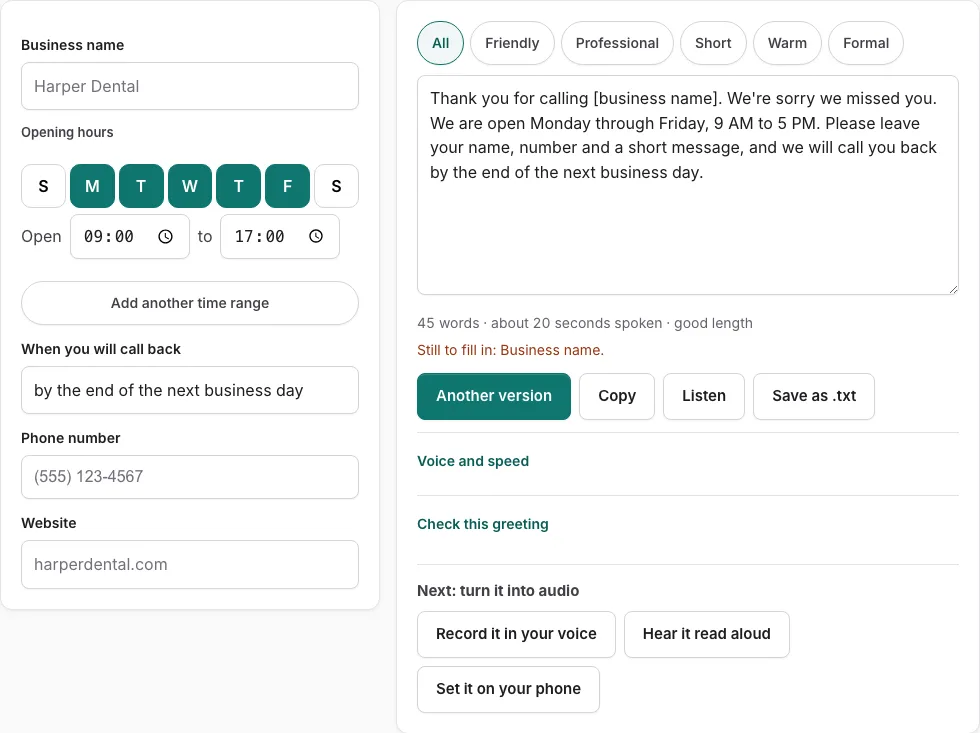
How to use the business voicemail greeting generator
- Type your business name in the first field. An empty field shows a bracketed placeholder such as [business name], and a line under the form lists what is still missing.
- Enter your opening hours. The tool writes the spoken hours phrase for you.
- Enter your callback time. Add a phone number and website only if you want them spoken.
- Read the script on the right. It updates as you type.
- Press one of the tone buttons (friendly, professional, short, warm or formal) to filter the versions.
- Press “Another version” for a different template of the same type. It will not repeat the current one.
- Check the line under the text for word count and estimated speaking time.
- Press “Check this greeting” to score who answered, why you missed the call, what callers should do, when they will hear back and length (6-30 seconds). Business types also get an opening-hours check.
- Press “Listen” to hear the script read aloud with the voices installed on your device. Phone numbers are read digit by digit. It does not create an audio file.
- Press “Copy” or “Save as .txt” to keep the script. “Record it in your voice” opens the recorder with the script on screen.
If you edit the script by hand, the changes stay in the text box. Later field changes are not applied until you press “Rebuild from the fields”.
How long should a business voicemail greeting be?
A business greeting should be short enough that a caller hears all of it before deciding to leave a message. The check in this tool scores length between 6 and 30 seconds. The speaking time is an estimate based on 2.4 words per second, plus 0.35 seconds after each sentence and 0.45 seconds per spoken digit. It is not a measurement, so play the greeting back with “Listen” before you rely on it. “Listen” reads the script aloud using the speech voices already installed on your device, and it reads phone numbers digit by digit. It does not produce an audio file, so playback is the only way to hear the timing for yourself.
What should a business voicemail greeting say?
A business greeting should name the company, say that you cannot take the call, give your opening hours, tell callers what to leave, and promise a call-back time. Each of these parts answers a question a caller has when they reach voicemail. The “Check this greeting” button scores the text against these points, so a missing item shows up before you save the script. The five checked points are who answered, why you did not pick up, what to do, when they will hear back, and length. For business types, opening hours are checked too.
How do I add opening hours to a business voicemail greeting?
Enter your hours in the opening hours field, and the tool builds the spoken hours phrase for the script. The check also looks for opening hours when the business type calls for them. If you edit the hours by hand in the script, remember that changes to the field are not applied until you press “Rebuild from the fields”, so use that button after you change the hours in the form. Empty fields appear as bracketed placeholders such as [business name], and a line lists what is still to fill in, so check it before you copy or save.
Frequently asked questions
How long should a voicemail greeting be?
Keep it within the 6 to 30 second range that the check uses. The speaking time shown under the script is an estimate, so use “Listen” to hear how it sounds.
Can I change the script after the tool writes it?
Yes. The script is a text box you can edit by hand. Once you edit it, changes you make in the fields are not applied until you press “Rebuild from the fields”, so make field changes first or rebuild afterwards.
Does the tool record my voice?
No. “Listen” reads the script aloud with the voices already on your device, and it does not produce an audio file. “Record it in your voice” opens the recorder with the script on screen so you can read it yourself.
Does the tool keep what I type?
The text is not stored. Use “Copy” or “Save as .txt” to keep a copy of the script before you leave the page.
What does the check tell me?
“Check this greeting” scores the script against five points: who answered, why you did not pick up, what callers should do, when they will hear back, and a length of 6 to 30 seconds. For business types, it also checks your opening hours.
Related tools
- Voicemail Greeting for Small Business: Use it for for owner-run shops and studios.
- After-Hours Voicemail Greeting Generator: Use it for after-hours greetings with spoken hours.
- Holiday Voicemail Greeting Generator: Use it for holiday greetings with reopening date.
- Professional Voicemail Greeting Generator: Use it for professional greetings with a checklist.
- Voicemail Greeting Generator: Use it for greeting scripts for 17 situations.
- Personal Voicemail Greeting Generator: Use it for personal greetings for a cell phone.
- How to Record a Voicemail Greeting Online: Use it for record and download a phone-ready WAV.
- Voicemail Greetings: Use it to browse business, personal, holiday, funny and more.