
After-Hours Voicemail Greeting Generator
Set your opening days and times and get an after-hours greeting that sounds natural when spoken.
Free · runs in your browser · nothing is uploaded
An after hours voicemail greeting is easiest to write when your opening hours are turned into a sentence callers can follow, which the day buttons and time boxes here do for you. You fill in your business name, opening hours, when you will call back, an urgent line and your website, and a complete script appears on the right. The greeting tells callers who they reached, why nobody picked up, what to do next and when they will hear back.
The page holds 10 versions, so you can compare wording and choose the one that sounds like your office. Tone buttons filter the versions, and “Another version” swaps in a different template without repeating the current one.
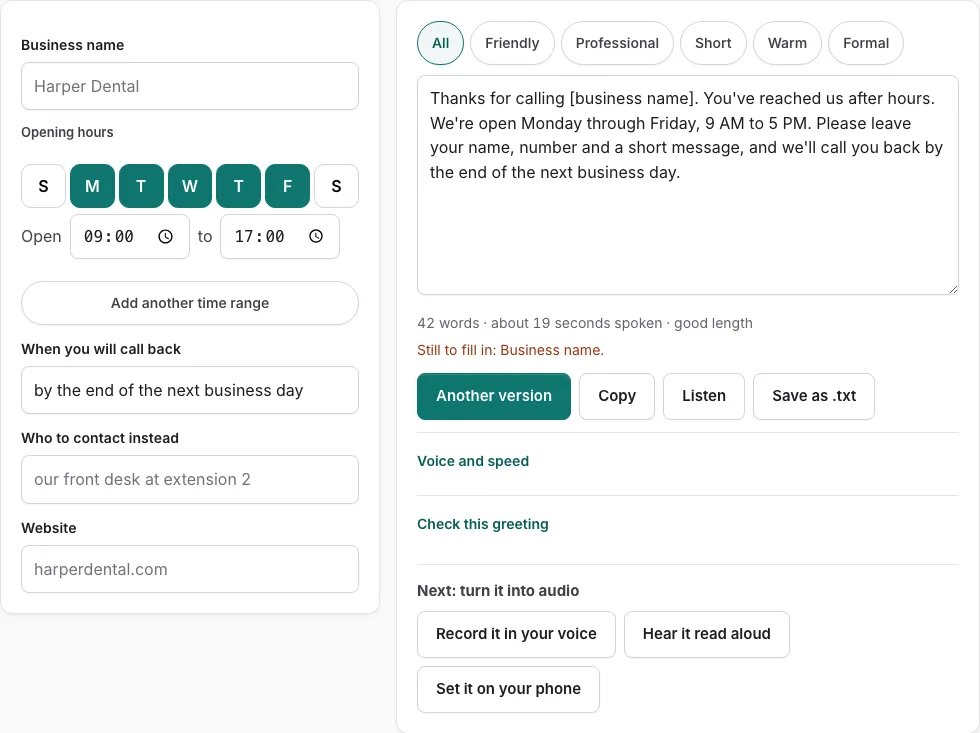
How to use the After-Hours Voicemail Greeting Tool
- Type your business name in the business name field.
- Enter your opening hours. Tap the day buttons for the days you are open, then set the times. You can add up to three time ranges, for example a short Saturday.
- Enter when you will call back.
- Enter the urgent line that callers should use for emergencies.
- Enter your website.
- Look at the script on the right. Any empty field shows as a bracketed placeholder such as [business name], and a line lists what is still to fill in.
- Tap a tone button to filter the versions, or press “Another version” to see a different template.
- Edit the text by hand if you want. After you edit, changes in the fields are not applied until you press “Rebuild from the fields”.
- Check the word count and the estimated speaking time under the text.
- Press “Listen” to hear the script read aloud. Phone numbers are read digit by digit.
- Press “Copy”, “Save as .txt”, or “Record it in your voice” to finish.
The hours builder writes your day buttons and times as sentences. Entering Monday through Friday, 8:30 AM to 5 PM, and Saturday, 10 AM to 2 PM, produces both ranges in the greeting without any typing on your part.
What should an after-hours voicemail greeting say?
A good greeting answers the four questions a caller has when nobody picks up: whose line this is, why no one is answering, what to do now, and when someone will call back. The tool’s check scores the text on those points, plus a length of 6 to 30 seconds.
- Who answered: your business name.
- Why nobody picked up: you are closed, and your hours.
- What to do: leave a message after the tone, or call the urgent line for emergencies.
- When they will hear back: your callback time.
- Length: keep the whole greeting between 6 and 30 seconds.
How should I structure my business voicemail greeting?
Build the greeting so that every sentence moves the caller toward one action, which is leaving a message. Put the most important facts first, because callers often hang up once they hear the reason they reached a machine.
- Open with your business name.
- State the hours you are open.
- Give the urgent line for true emergencies.
- Tell them when you will call back.
- Ask them to leave a message after the tone, and add your website for more information.
Business voicemail greeting with hours
The hours builder turns day buttons and times into spoken sentences, so the greeting reads the way a person would say it aloud. Consecutive days join into a range. Days with a gap between them are listed one by one. Times are spoken in words where a clock reading is unclear.
| You enter | The greeting says |
|---|---|
| 12:00 | noon |
| 00:00 | midnight |
| Monday to Friday, 8:30 AM to 5 PM | Monday through Friday, 8:30 AM to 5 PM |
Voicemail greeting for office after hours
An office greeting follows the same five points, but the hours usually matter more. Enter every day and time range you cover, then check the placeholder line to make sure nothing is missing before you copy the text.
Frequently asked questions
What are some cool voicemail greetings?
This page offers 10 versions, each a different template for the same type of greeting. Tap a tone button to narrow them down, or press “Another version” until one fits your office.
Should I use music or humor in my voicemail greeting?
Choose a tone that suits the people who call you, since a caller with a problem may not want a joke. The tone buttons help you pick a version that matches your callers, and you can still edit the text by hand.
Are voicemail greetings different for small and large businesses?
Yes, they usually are. A small shop may need one set of hours and one callback time, while a larger office may list several ranges, so the tool allows up to three time ranges for either size.
What should I add as a call to action in my voicemail greeting?
Your call to action is the step you want the caller to take, usually leaving a message or visiting your website. Enter your website in its field, and enter the urgent line for emergencies only.
How do I write a voicemail greeting for an office after hours?
Fill in the business name, opening hours, callback time, urgent line and website. When the placeholder line is empty, press “Check this greeting” to confirm that the text covers all five points.
Related tools
- Business Voicemail Greeting Generator: Use it for business greetings with spoken hours.
- Holiday Voicemail Greeting Generator: Use it for holiday greetings with reopening date.
- Voicemail Greeting for Small Business: Use it for for owner-run shops and studios.
- Voicemail Greeting for Medical Office: Use it for medical greetings with an emergency line.
- Voicemail Greeting Generator: Use it for greeting scripts for 17 situations.
- Personal Voicemail Greeting Generator: Use it for personal greetings for a cell phone.
- How to Record a Voicemail Greeting Online: Use it for record and download a phone-ready WAV.
- Voicemail Greetings: Use it to browse business, personal, holiday, funny and more.