
After Hours Auto Attendant Script Generator
Create structured after-hours auto attendant scripts that route emergency calls and direct non-urgent inquiries to voicemail.
Free · runs in your browser · nothing is uploaded
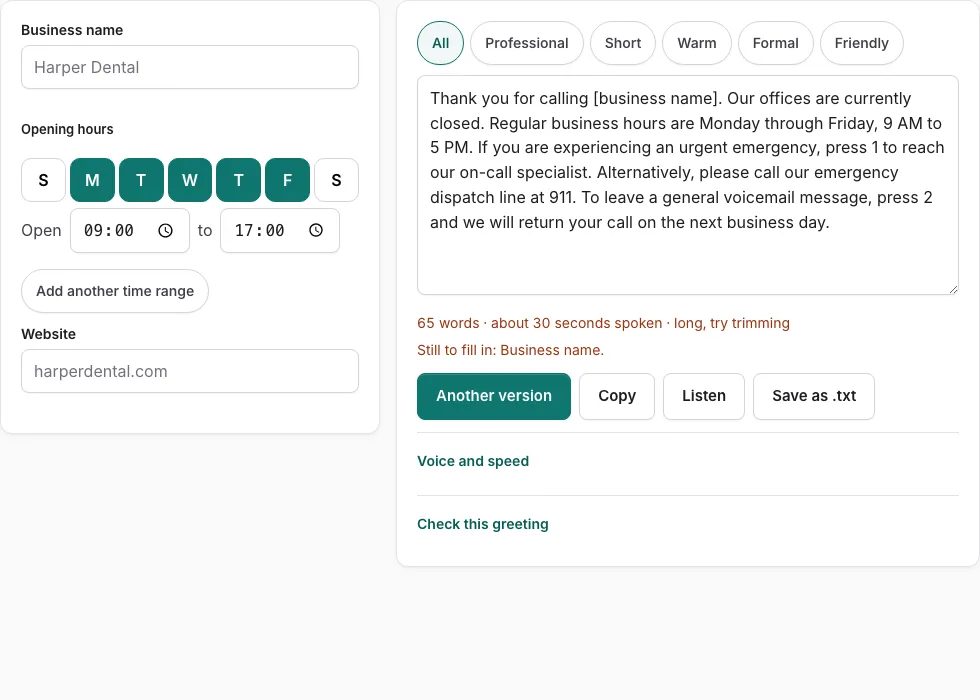
How to use the After Hours Auto Attendant Script Generator
Follow these steps to create a clear after-hours phone tree menu that separates urgent emergencies from general messages.
- Enter your company name in the Business Name field above.
- Enter your regular operating hours so the script states exactly when your team is open.
- Enter your company website address for callers seeking online assistance.
- If applicable, specify an emergency telephone number or on-call dispatch protocol.
- Select a tone option (Professional, Short, Warm, Formal, or Friendly) to view matching templates.
- Review the script options on the right; adjust department wording or keypad numbers to match your PBX configuration.
- Click “Listen” to hear the script read aloud and verify that menu pauses sound natural.
- Check the word count and estimated speaking time under the script box to ensure it stays under 30 seconds.
- Click “Check this greeting” to evaluate the completeness of closure information.
- Click “Copy” to save the text or “Save as .txt” to download the script for your voice recording.
- Upload the audio file to your telephone provider’s after-hours schedule tab so it activates automatically.
Night menu pacing recommendations
Speak with calm reassurance and maintain an even pace. Callers reaching your after-hours line may be dealing with urgent maintenance or critical service issues and need clear, easily understandable directions.
How to structure an after-hours auto attendant script
An effective after-hours auto attendant script requires clear triage: it must immediately acknowledge that the office is closed, state normal operating hours, and provide separate paths for urgent emergencies versus general inquiries.
Forcing callers to listen through lengthy daytime department menus when nobody is available creates frustration and leads to hang-ups.
Key components of a night mode IVR tree
- Immediate Closure Notice: State within the first five seconds that your office is currently closed so callers understand live operators are unavailable.
- Normal Business Hours: State your standard opening hours and days so callers know when live assistance will resume.
- Emergency Escalation Option: If your company offers 24/7 emergency response (such as property management, HVAC, plumbing, or IT infrastructure), provide a dedicated option (e.g., “Press 1 for our on-call emergency technician”).
- General Voicemail Mailbox: Instruct non-urgent callers to press a key to record a voicemail, specifying that calls will be returned on the next business day.
- Self-Service Website Referral: Direct callers to your website or online customer portal where they can check order status, schedule appointments, or access support documentation.
| Component | Purpose | Recommended Script Text |
|---|---|---|
| Closure Statement | Sets immediate expectation | “Thank you for calling [Company]. Our offices are currently closed.” |
| Operating Hours | Informs when team returns | “Our regular business hours are Monday through Friday, 8 AM to 5 PM.” |
| Urgent Escalation | Routes true emergencies | “If this is an urgent maintenance emergency, press 1 to reach our on-call team.” |
| Voicemail Route | Captures routine inquiries | “To leave a message for our morning staff, press 2.” |
| Web Channel | Self-service alternative | “You can also submit service requests online 24/7 at [Website].” |
Best practices for night mode telephone recordings
Operating an unattended telephone tree overnight requires clear disclaimers and reliable routing:
- Life-Safety Disclaimers: If your organization handles healthcare, property management, or security services, include a disclaimer stating: “If you are experiencing a life-threatening emergency, please hang up and dial 911.”
- Audio Quality: Ensure the night greeting has identical volume and recording quality as your daytime auto attendant to maintain professional brand consistency.
- Mailbox Notification Rules: Configure your phone system to send instant email or SMS alerts to on-call managers whenever an emergency voicemail is recorded.
Automated schedule switches in cloud PBX systems
Most modern phone platforms (such as RingCentral, Nextiva, and 8x8) allow administrators to link daytime and after-hours auto attendants to business hour schedules, ensuring the night menu engages automatically at closing time.
Monitoring after-hours voicemail response times
Establish internal service metrics requiring on-call technicians or morning supervisors to review all overnight voicemail logs within 30 minutes of opening to maintain high client satisfaction scores.
Frequently asked questions
What is the difference between a daytime and after-hours auto attendant?
A daytime auto attendant routes calls to live departments (sales, support, billing), while an after-hours attendant announces office closures and routes callers to voicemail or on-call emergency staff.
Should an after-hours script list daytime department options?
No. Listing daytime extensions when nobody is available frustrates callers. Offer only relevant options: leave a voicemail, escalate an emergency, or visit the website.
How long should an after-hours auto attendant script be?
Keep after-hours scripts under 25 to 30 seconds. Callers who are redirected after hours appreciate brief announcements with direct routing.
Can cloud phone systems switch to night mode automatically?
Yes. Most modern cloud PBX systems (RingCentral, Nextiva, Zoom Phone, Dialpad) allow administrators to set automated schedules that switch greetings based on business hours.
How should on-call emergency transfers be configured?
Configure urgent keypad options to ring an external on-call cell phone or rotation group. If unanswered after 4 rings, route the call to a high-priority emergency voicemail box with SMS alerts.
What should happen if an after-hours caller presses an invalid digit?
Configure your PBX to replay the after-hours menu once upon an invalid keypress, and then route the caller automatically to your general voicemail box if no input is received.
Related tools
- Auto Attendant Script Generator: Phone tree menus
- After Hours Voicemail Greeting: Opening hours schedule
- Business Voicemail Greeting Generator: Commercial scripts
- How to Set Voicemail Greeting on Nextiva: NextOS upload
- How to Set Voicemail Greeting on Zoom Phone: Audio library
- Record Voicemail Greeting Online: Studio WAV recorder